

WYZE Cam Pan v3 Indoor/Outdoor IP65 1080P 360° Pan/Tilt/Zoom WiFi Smart Home Security Camera, Motion Tracking for Baby/Pet, Color Night Vision, Works with Alexa&Google Assistant, Free Expert Setup
Original price was: $39.98.$29.98Current price is: $29.98.



Price: $39.98 - $29.98
(as of Aug 10, 2025 00:46:27 UTC – Details)
Introducing Wyze Cam Pan v3, the pot-bellied little pan-and-tilt wonder who’s about to answer all your home monitoring needs. Forget about pets and people leaving the camera’s field-of-view. With 360° horizontal range, and a full 180° vertical range, the “field-of-view” is the entire room. And with an IP65 weather rating, that field-of-view can now extend to the outdoors—sun, rain, wind, or snow. Automated surveillance, whisper-quiet operation, and smart AI detections and tracking, all in a perfect, portly little package. Wyze Cam Pan v3 proves that even if you’re adorable, you can still be an action hero. Outdoor power adapter sold separately.
Versatile Security Camera for Home Security: Control this indoor camera remotely via the Wyze app, with 360° pan and 180° tilt for full-room coverage. Set 4 waypoints for automated monitoring or zoom in 1080p HD to inspect details. (Not 5G compatible.)
Durable Outdoor Security Camera (IP65-rated): Built to withstand rain and extreme temperatures (requires Outdoor Power Adapter). Ideal for tracking activity outside your home or as a discreet indoor camera for nurseries or entryways
Advanced Motion-tracking Pet Camera: Automatically locks onto movement—whether it’s a dog, intruder, or family member—and follows the action smoothly. Perfect as a dog camera for monitoring pets or securing entry points
Quiet, Discreet Security Camera Indoor/outdoor: Engineered for silent, precise pan-and-tilt movements. Use indoors for baby monitoring or outdoors (with adapter) to surveil your property without disturbing noise
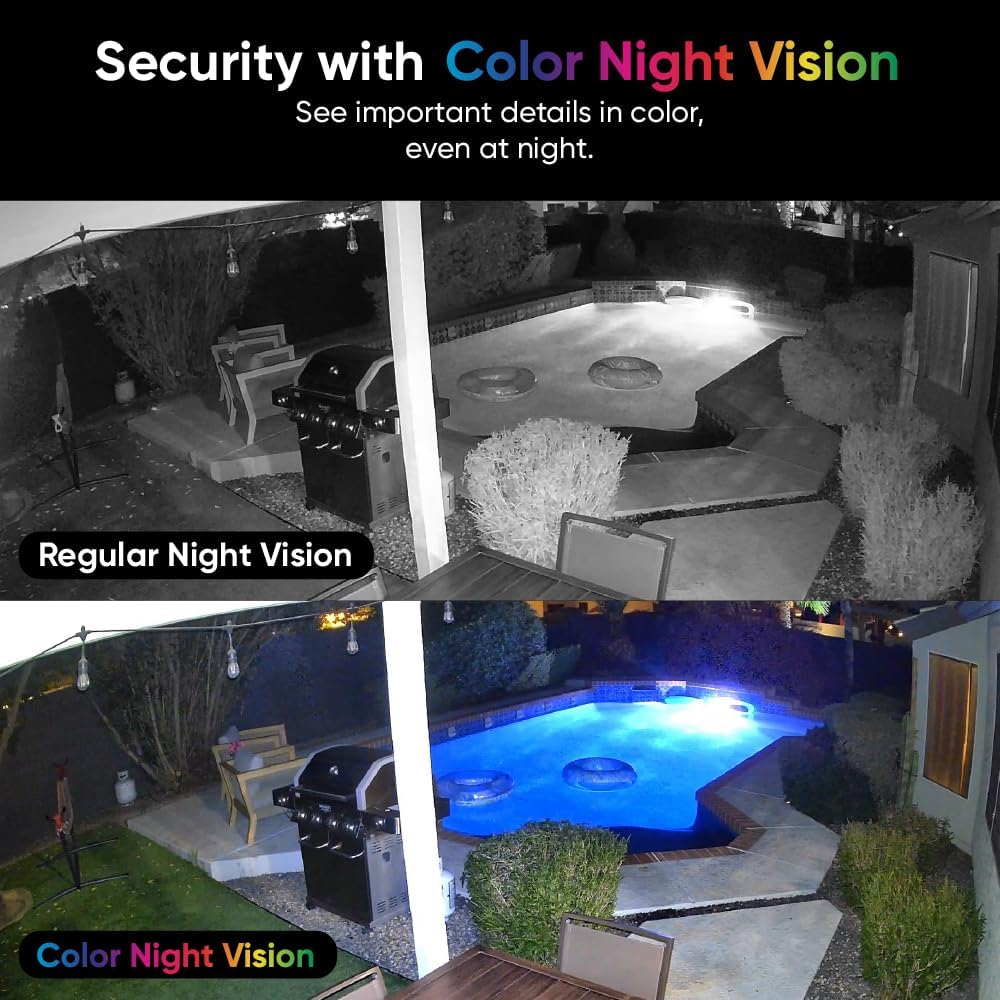
Color Night Vision Security Camera Outdoor/indoor: Capture vivid nighttime footage in low-light conditions, ideal for patrolling dark yards, driveways, or dimly lit rooms as a reliable home security camera
Customers say
Customers praise the security camera’s great video quality, ease of setup, and picture that’s perfect day and night, with color night vision that helps in low-light conditions. The motion tracking feature works well, and customers find it offers great value for money. However, connectivity is a concern as the camera frequently loses connection, and functionality receives mixed reviews with some reporting it doesn’t work at all.
8 reviews for WYZE Cam Pan v3 Indoor/Outdoor IP65 1080P 360° Pan/Tilt/Zoom WiFi Smart Home Security Camera, Motion Tracking for Baby/Pet, Color Night Vision, Works with Alexa&Google Assistant, Free Expert Setup
Add a review
Related Products





Original price was: $39.98.$29.98Current price is: $29.98.

DL NB –
Have been using for several years with excellent performance. Great value, no monthly fee required.
Great cameras, use them daily. Really like the cloud service and they work without any fees with short cloud clips or full replay if you purchase separately an XD card and set it to record to it. I like the set scanning option, though you can’t choose how long it stays in one view. But, you can program from 2 to 4 locations to scan and it will spend equal time on each. The night vision is amazing and the regular picture quality is great. Note that these are wide field cameras and won’t really be able to ID a license plate unless right next to the vehicle.They work entirely on wifi and no special configuration is needed (very easy to setup with a smart phone and the app). You can also share the camera with others so they can see what’s going on as well (without them having to pay anything). Have been using for more than two years and more than a handful of these.Full disclosure, I did have one fail (out of more than 6 at the time). It was during a hurricane and was directly struck by lightning. My other cameras were also outside and directly exposed in multiple hurricanes and did not get struck. They work fine still. I have used them in the free mode and they work great. However, I like the extra features enough I pay for the extra service and think it is well worth it. But I like being able to go back to free if I want.
Arby –
Makes a Great Baby Monitor
Got two of these after I wasn’t finding anything I liked for a new baby monitor. The fact these are always running but connect to our phone is a lot nicer than carrying around the parent unit of our old monitor, which we also needed to plug in often as it’s battery life was terrible. Plus, once we don’t need monitors anymore, I can use them as actual security cameras.These have a very nice, modern look, and the build quality is actually great considering the price, I expected these to feel a lot cheaper. They have a full range of motion, which is a massive boost over our last baby monitor, which didn’t move at all. They also come with cords and a power adapter, which is great since many companies stiff you in this area, expecting you to pay for adapters or use others that you already own (looking at you cell phones).I’ll preface this section by clarifying that we’re using these in conjunction with an audio only baby monitor. This is because my wife wanted something that would quickly play the sound in each room if it heard crying. To be clear, the camera will play audio just fine, but having the app open constantly isn’t ideal, and when it’s not open it sends notifications of a sound or motion event. The speed of these notifications is very fast, but the sound isn’t enough to wake us at night, wheras the sound of crying wakes us up fast.When the camera detects motion, it’s default setting is to track the source until it stops moving or leaves it’s view. This is incredibly cool and a great feature in a security camera, but for a baby monitor, it’s less great, at least for older kids, as they’ll be drawn towards it’s movement and either be scared of it, or try and play with it (if it’s reachable). I turned off the motion alerts so the camera remains fixed wherever I point it, and I can move it in the app if necessary.For sound alerts, as I said before, they’re quick to notify you if the app isn’t open, and the sound just plays if you’re viewing the camera. There is actually a setting to have it trigger alerts on crying sounds vs other sounds, however this feature is locked behind the subscription service, so I was not able to test this. Regular sound alerst work pretty well, and didn’t trigger for our ambient noise machine, but it did for loud cars going by (we get a few annoying drivers late at night) and once for a train horn in the distance (bit surprised at that one, but speaks to it’s mic I guess).The app is nice to use and fairly straightforward, and you can easily view multiple cameras at once, and select one of them if you want to move the camera or hear the audio. You can also create a widget on iPhone (and I’m sure on Android as well) that links directly to the camera feed, so you don’t need to swipe around looking for the page or folder you put the app in, open it and then open the feed, rather just swipe to the widgets and tap the button to jump right to the feed. If you have two cameras, you can have both there and swipe before tapping to swap between.Overall very nice cameras, they make great baby monitors on their own or coupled with an audio monitor, and for a far more affordable price (even with a two kid audo monitor, and two of these cameras, it came out almost $50 less than a two camera baby monitor on the cheaper end).
martin –
If you’re looking for a camera with features and quality, look no further!
PROS:-Price-Ease of use-Overall Quality-App / featuresCONS:-A.I. detection needs improvement.-Sound when moving-Video Quality when camera movesPROSI just want to start off by saying that for the price, these are EXCELLENT cameras. I have 3 Wyze Pan Cam V3’s so far and have plans to purchase more for my mother’s house in the near future.Starting off with price, these are pretty inexpensive units, considering the amount of features packed into them. There are certainly much higher quality units out there, but the cost will increase dramatically for them as well. In my opinion, you get far more than you pay for with the Pan Cam V3 making them well worth their low cost.It does not get much easier to get going than it is with these guys. Just plug in the included usb cable to the included wall adapter, download the app and after just a few minutes of setup, youâre up and running. The camera can be used indoors or outdoors. If using indoors, find your suitable location, plug it in and go. The camera is very quiet when panning, to anyone in the room with it. I will say though, that when watching back recorded videos, you can definitely hear the movement, which I was surprised to find. More on this in the CONS section.The build quality of the camera is good. It does not feel cheaply made at all (especially considering the low price point). Overall video quality is good as well, but there are some slight issues I have run into when panning (see the CONS section for details). Audio quality is good as well. I can make out voices and have conversations with anyone outside when needed, so the 2 way audio works well in that regard.The app has a TON of options. You can go basic or really dive into them for more control if you choose. I like that you have this flexibility. You can set various sensitivity options for detection events, event recording, alarm settings, notifications, etc. Some features are paid only features, but at the most basic level, as long as you have an SD Card (not included) installed you will be able to go back and watch videos of saved events.CONSA.I. options are available within the app for this camera and I would say that this is the biggest opportunity for improvement. The A.I. options allow you to select event triggers for things like cars, people, pets, package detection, etc. In my experience, cars have been detected as pets, pets as cars, pets as packages and so on. The A.I. in this respect has a ways to go still. I have also experienced the camera get confused and just âstaringâ at the wall next to where it is mounted. It detected shadow movement from sun/trees and locked in on it for hours at times. It took me a while of playing with detection settings to get past this for the most part, but it will still occasionally happen from time to time. The app does have the option for you to give feedback on what was in the detection event, such as people, animals, cars, etc. I presume this will help them improve the detection as time goes on, so this is promising.The other big issue I have is with the âwaypointsâ You can select them based on where you want the camera to stop when it is in âpan and scanâ mode. I have mine at the center of my house lengthwise. I have a waypoint that covers from the left end of the house to the center, then a 2nd that covers from the center to the right end of the house. You can adjust these waypoints up, down left and right as needed to get the best coverage to suit your needs. NICE! The issue I have found though, is that over time, these waypoints can wander so to speak. I can have them set and check a few weeks later and the cameraâs left most point will be further to the left that where it was set for example. Or I can set at a specific height, and later the camera angle is higher or lower than where I had set it. A minor annoyance, as you have to go back in and re-set your waypoints, but itâs enough to be worth mentioning. Again though, for the price point this is definitely something I am ok dealing with.My other issues are with video and audio when panning. When you pan, you can audibly hear (in recorded video, not in person) the camera moving on one camera it sounds like a woodpecker, lol. A minor annoyance again, as I am really more interested in the video from these, not the audio but again, I thought itâs worth mentioning. Video quality, when panning also goes blurry. Once the pan stops, the video clears within a second or so. Something I also thought worth mentioning for those considering these cameras, but I once again restate that for myself, given the price point I can deal with this minor annoyance.Overall, despite the minor gripes listed here, I absolutely love these cameras. I have 3 so far and will definitely be adding more to the collection for sure. If youâre looking for inexpensive, good quality cameras for some additional peace of mind, these are absolutely worth every penny!
SZ –
Easy to set up. Good quality
Javed Mandary –
Wyze pan tilt v3 came but is not powering despite trying all kinds of different connections
Shane E. –
The WYZE Cam Pan v3 is an exceptional camera, offering outstanding value for the price. The setup is easy, and the camera’s 360-degree panning capability is incredibly useful for covering large areas. The video quality is impressive, with crisp resolution and vibrant colors, even in low light. The night vision is surprisingly clear and gives peace of mind in complete darkness. I love that it works both indoors and outdoors, as itâs weatherproof, making it versatile for any setup.The two-way audio is clear, and the motion tracking works well, following movement across the room or outside. The app is user-friendly, allowing me to check in on my property, adjust settings, and communicate with anyone nearby through the camera. The price is hard to beat for the features it providesâespecially when considering other high-end security cameras.However, a word of cautionâwhile the camera itself is fantastic, Wyze offers additional features through paid subscriptions. The cloud storage for video footage, for instance, comes with a monthly fee, which might be a deal-breaker for those expecting a fully free service. The paid software includes more advanced features like event recording and longer video history, which are useful but not necessary for basic functionality. I was a little disappointed to find that some features that initially seemed to be included are locked behind a paywall.That said, if you don’t mind the subscription cost or can work with the free features, the Wyze Cam Pan v3 is a great choice for anyone looking to enhance their security system. It’s affordable, versatile, and reliable, with a few caveats regarding additional paid features. Overall, it’s still one of the best value security cameras on the market!
ãã¸ã㸠–
åæ±èª¬æãè±èªãªã®ã§ã調ã¹ãªããè¨å®ãã¾ãããè²ã ãµãã¹ã¯ã®ç»é¢ãããã¾ããããµãã¹ã¯ã«ã¯ãã使ç¨ãã¦ãã¾ãã
CRVO –
Resumen 2024.01.01: Excelente camara con funciones varias sin pagar.Compre 2 camaras (para empezar). Me interesaba el “360”.Las camaras vienen bien protegidas. Trae camara, cable, cuadro de energia (5V 2A), manual, chilillos de montaje, base para montar en pared/techo.De inicio cuando las conectas se mueven, bajas la aplicacion y fueron faciles de instalar y usarlas. Por defecto tiene activado el “Track Motion”. Le puse una memoria de 64GB. La app es facil de usar y entender. La camara se ve de buen material, se ve bien hecha y resistente.La calidad de grabacion es decentemente buena, puedes cambiar a 360 o 720.Los movimientos al girar la camara son suaves, puedes ver las grabaciones facilmente, acceder a ella rapidamente, grabar videos o fotos, puedes darle zoom, poner zonas de grabacion, configurar horarios, eventos, soporta IFTTT, eventos por geolocalizacion (al parecer solo USA y Canada) y otras. Las funciones avanzadas las desconozco, ya que son de paga y basicamente son: guardar en la.nube, sensores de reconocimiento avanzado, acceder por la pagina web de Wyze y otras que no.recuerdo.Las voy a poner en el exterior y te sugieren (obligado) comprar un adaptador para exterior. Si tienes conocimientos basicos puedes hacer tu propia “caja” para poner el cuadro de energia cerca de la camara.Finalmente, soportan el protocolo RTSP, el cual te permite usarlo con aplicaciones de 3ros, NVR y/o Home Assistant, incluso como camara web. Solo que lei que aun no sale.un firmware para este modelo, seguire leyendo e investigando.2024.01.11.Con una memoria de 64GB graba aproximadamente 5 a 11 dias.La exterior tiene 5 diasLa interior tiene 11 diasAmbas configuradas de la misma manera (HD, grabacion continua, sonido, eventos, vision nocturna).Supongo la diferencia principal es que con luz graba a 20FPS, y en modo nocturno graba a 15FPS, asi que la interior casi siempre tiene menos luz.2025.04.20.Ya tengo 8 de ellas. 6 instaladas, 4 color blanco y 4 color negro. 5 en el exterior y 1 en el interior. Las funciones gratuitas son mas que suficiente para usarlas. Estan configuradas todas para grabar 24/7, tienen el firmware mas actual y andan muy bien las 6. Como mencione anteriormente, les hice “adaptaciones” para ponerlas en el exterior ya que no quize gastar mas y comprar el “adaptador original para exterior”. Las tengo compartidas con otro usuario y ademas las uso con Alexa Echo Show 5, solo se pueden ver 2 al mismo tiempo. A las exteriores les ha pegado sol directo de mas de 37º, lluvias ligeras y fuertes, aires fuertes, polvo constante, tela de araña y quien sabe que mas y andan bien. Sigo recomendandolas.