

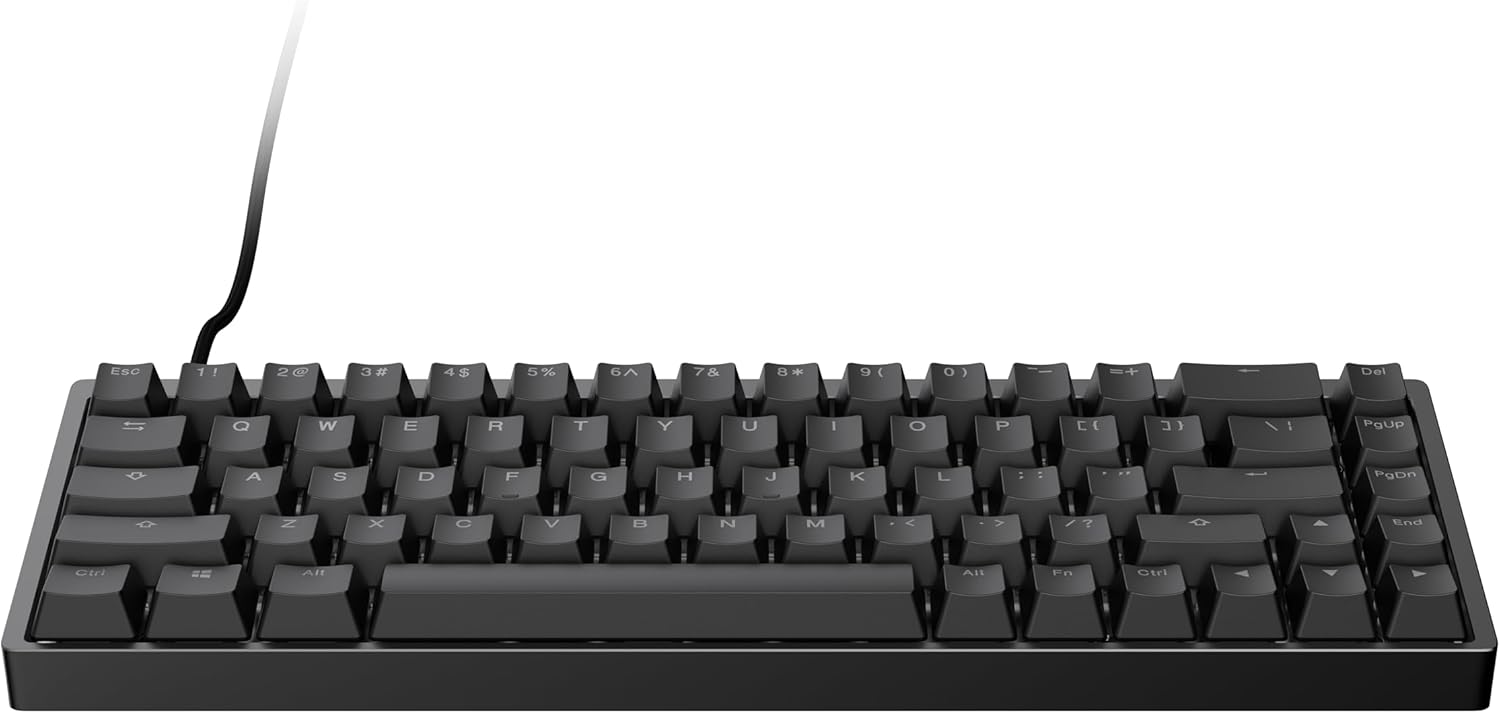
ENDGAME GEAR KB65HE Gaming Keyboard, ANSI US – Hall Effect Technology, Gateron KS-37B Switches, Aluminum Body, Ducky Doubleshot PBT Keycaps, RGB Lighting
$64.99



Price: $64.99
(as of Sep 20, 2025 15:27:32 UTC – Details)
Product description


HALL EFFECT TECHNOLOGY: Redefine your gaming with innovative Hall Effect sensors, offering unmatched durability and rapid trigger response.
Gateron KS-37B SWITCHES: Experience ultra-smooth keystrokes with Dual-rail structure, pre-lubed stabilizers, and self-lubricating POM material for precision and speed.
SLEEK ALUMINUM BODY: Precision CNC-machined aluminum case for durability and aesthetics, with adjustable feet and a non-slip silicon strip for a comfortable gaming experience.
DUCKY DOUBLESHOT PBT KEYCAPS: These keycaps were designed in collaboration with Ducky, featuring a two-layer injection molding process for durable legends, PBT material for superior feel, and a non-slip textured surface.
CUSTOMIZABLE RGB LIGHTING: Elevate your setup with per-key RGB lighting customization using optional software, unlocking the keyboard’s full potential for personalized aesthetics.
Customers say
Customers find this gaming keyboard to be a solid 9/10 quality keyboard with nice sound and high build quality. They appreciate its functionality, ease of use, and consider it good value for money. The actuation accuracy receives mixed feedback.
6 reviews for ENDGAME GEAR KB65HE Gaming Keyboard, ANSI US – Hall Effect Technology, Gateron KS-37B Switches, Aluminum Body, Ducky Doubleshot PBT Keycaps, RGB Lighting
Add a review
Related Products


$64.99

Christian –
Upgraded from a SteelSeries Apex Pro
This keyboard is awesome, in every way it feels like a high quality build. The software is also easy to use and is not invasive like a lot of other product software out there is. I’m not somebody that ordinarily likes to use cliche adjectives, so trust me when I say that these keys feel absolutely butter smooth to press. It is unlike any keyboard I’ve ever used, not only are they smooth, but they are also extremely QUIET, and they have a nice texture to them as well, it’s not a slick texture like some keyboards have. Rather, the keys have a fine grit to them that makes them feel more tactile and less “slippery” for lack of a better term. I should also mention that this keyboard is very heavy which is a huge plus for gaming, this thing ain’t going nowhere once you set it down on your desk, you will never have to worry about it sliding while playing.Can’t recommend this thing enough.
Shaun –
Amazing quality but poor execution with hardware
Great typing experience and amazing sound but the software and implementation of it is horrible there is no set actuation point only controllable up and down with the rapid trigger. The 8000hz mode lowers the semseitivity to 0.4mm for rapid trigger from the 0.1 norm I use this keyboard for osu and some shooters so the quality of the rapid trigger is the breaking point of this keyboard for me but for any other type of use this keyboard is amazing and would recommend even for osu if you want a cheaper board thatâs amazing quality def a go to
dohjin –
Good Value, but Mid Compared to Others
I’ll start with that I am pretty familiar with quality keyboards; even the really bad keyboards.Starting with the build quality, it’s pretty good for the $140 price range.It is a cheaper alloy of aluminum, but the coating is decent and it feels well-weighted. There was no scratches or scuffs when I unboxed the keyboard. The included extra rubber feet are a nice addition to give the keyboard a bit of an extra lift. As someone that prefers an 8° to 10° typing angle, the feet that bump it up from 5° to 7.5° of angle are a welcome little plus.A knock against the chassis though was discovered when I initially unboxed it. I set the keyboard on a level surface and tapped the corners to make sure that the aluminum did not warp in transport. Unfortunately, the lower right corner was slightly lifted for my keyboard, but I was able to correct this with a disassembly, some heat and heat protective gloves to bend the corner down to being flat. Once I did that, the aluminum has stayed in that shape and has been level since. No more rattle from the lower right corner.The switches are lubed pretty well, but the quality of the lubing is not consistent from switch to switch. For my particular keyboard, there are a few dry keys. Q, W, 7, Tab, Del and PgDn feel a bit less lubed and I can feel a bit of scratch though the lube. I don’t have multiple copies of the board, so I won’t make claims of batch inconsistency, however I do still want to share my experience with the board in it’s entirety.To test for case ping, I removed the silicon damper to test the tray-mount for pinging. Sure enough, there was plenty, but returning the silicon damper back to it’s home nearly eliminated the pinging entirely. It very well mitigates any pinging I can hear on hard surfaces. Also, if used on a desk mat or even a very large mousepad, I couldn’t hear anything chattering or pinging. Truly speaks to the quality of the silicon damper.A really sore spot for the KB65HE is the software. It is clean, but it is also barren and odd; given it’s competition. Going right into it, the ‘Key Settings’ and ‘Light Effect’ tabs are suitable and easy to understand. Jumping into the ‘Advanced’ tab though, it is confusing for myself and I worry that it may confuse others that aren’t well antiquatedwith keyboard ‘driver’ software.Starting off with my digs at the software, why choose to allow a ‘Pressed threshold’ and a ‘Released threshold’? Other competitors, namely Razer, Wooting and Everglide, allow you to set the actuation points directly. The choice to choose a threshold implies that the switches are not capable of actuating the moment they are pressed at the minimum actuation points. When gaming, I experienced deadzones. Particularly in ‘osu!’, where this issue would be most visible and likely to be seen, if you set the release threshold to 1 in the software, it will result in a deadzone about 1mm wide; this occurs when you release the key and try to re-press the key before it has been fully released.Moving on to my second criticism of the software. It is not immediately apparent how to program macros. You might figure that, like the contemporaries, that this software would have either a tab dedicated to this function or use a clear label of ‘Macros’ that is well integrated into the software. In this case, however, the ‘Macros’ tab is represented by a Command Line or Terminal icon. This would not be apparent to anyone, at all, that this would be where you program any macros you would want or need. As far as I can tell, there is no indication anywhere on the product page that the icon used to represent the ‘Macros’ page in the software is the ‘Terminal’ icon.Bumping it up to my third issue; feature parity. I am not going to say that there is no care for this product or that it was just used as an excuse to get a quick buck out of the Hall Effect Keeb hypetrain, but it must be said that there are features that exist on boards, both more costly and cheaper, that aren’t present on the Endgame Gear board. Using a brand that I didn’t mention prior, Keychron, they allow the user to switch profiles without opening the software; this board requires that you open the software to change from a “Gaming” profile to a “Typing” profile, which is a massive bummer for a $140 board.Fourth issue I found was a floating reset. When the the release threshold is set to .1mm, I have found, for my keyboard at least, that there will be an additional 1mm deadzone. Best workaround I’ve found for this board is to set the release threshold to .2mm and that eliminates the deadzone. This tells that it is a software issue. Just like the other issues I’ve found, being that this should be able to correct this issue with a firmware or software update.These are software issues though; they can be added or fixed with later revisions of the current software that they use.Some software additions that would make this board EXTREMELY competitive would be:- Implementation of SOCD (Marketed as ‘Snap Tap’ by Razer)- Implementation of Profile Switching w/o the need of opening the software.- Migrating to a web app for configuration (which is going to be mentioned VERY soon).Now, this is the point where I’m going to be a bit controversial. Earlier I mentioned that I disassembled the keyboard to straighten the chassis, while I was waiting for the aluminum to cool back down I had a look at the board. This board has a very similar code to a brand that I am familiar with; DrunkDeer. Fortunately, I do have a DrunkDeer G65.I disassembled my G65 to have a look at the board and the part number was KG657U and the code for the part number that I found on my KB65HE’s board was KG657U. Oddly enough, I heard that there were similar part numbers with the HiGround Performance Base65. Disassembled that board to find that it was part number KG647U. I’m no expert when it comes to ODM or OEM practices, but as far as I was able to discern after contacting multiple companies and spending hours of personal time to get to the bottom of this, the HiGround board is simply just an older revision of the KB65HE’s board. The reason why I touch on this is because these are 3 different manufacturers, selling approximately the same product, but the disparity with the software is extremely wide between them.HiGround and DrunkDeer both have their software more well-adjusted to being consumer friendly and easily digestible, but the Endgame Gear application is missing features that I, and I would think many others, would appreciate being available to the customers.Returning from that tangent, I’m not saying that the board is overall a bad purchase. Despite the shortcomings of the software, I really do like this board. It ticks nearly all the boxes for $140, but the software, and I really do mean it, the software is the harshest sore spot I’ve found for this board.
Dom –
Best rapid trigger keyboard for the price
I own a Steelseries Apex Pro TKL and I used to own a Wooting 60he as well. I also have several custom boards. The Endgame gear board arguably feels faster than the apex and feels far better than both the Apex and the Wooting. The solid aluminum base feels and looks amazing. It makes the board sound great too. Iâve always been annoyed by the great feel and sound of custom boards while the fast boards arenât satisfying and feel cheap in comparison. The Endgame is the best feeling, sounding, and looking rapid trigger board Iâve used. My only complaint is the software. Itâs fairly minimalistic and while it works fine and is decently intuitive, it could be far better, especially in comparison to Steelseries, and my favorite software by Wooting. The RGB could be a lot more customizable. I wish the presets had more color options. I also think they could add other features to the board to keep it on point with the competing flagship boards. Overall it would be hands down one of the best keyboard on the market with a simple firmware and software update. ð
Rehab to Fab –
6ish months later
Was looking for a Wooting âcloneâ and came across this. Love that it is 65% as I feel arrow keys are a necessity. The software is amazing and the fact that you can set your actuation points is cool. Has a great weight to it and doesnât move around at all, the feet did give me some trouble at first as I couldnât get them all the way on. The RGB could definitely be a bit brighter, was kind of confused when I set it to max brightness and didnât get a whole lot. Sounds good, not amazing but not like those budget keyboards you can find for $30.100% would recommend if youâre looking for a mid range keyboard.
LiamHarrelson –
It’s decent.. I like
Pretty solid keyboard. Sounds pretty good the fancy switches work pretty well and you can adjust the threshold for the key depth presses in the program. Probably the best bang for you buck keyboard as far as rapid tap goes.My main complaint is the software. You can’t change a whole lot and and being that this is a 65% you lose certain buttons as they don’t have all the keys you would have on a full keyboard binded out of the box. As of right now you can’t change the function keys around in the software so you literally lose keys like insert for example.