
![GEEKOM A8 Max Mini PC[Ultimate Performance Edition] with AMD Ryzen 7 8745HS(Beats 6800H) Dual LAN Mini Computer 32GB DDR5 & 1TB SSD(Expandable), Radeon 780M Mini PC Windows 11 Pro/USB4/8K/ SD Slot](https://m.media-amazon.com/images/I/711DipO+2lL._AC_SL1500_.jpg "GEEKOM A8 Max Mini PC[Ultimate Performance Edition] with AMD Ryzen 7 8745HS(Beats 6800H) Dual LAN Mini Computer 32GB DDR5 & 1TB SSD(Expandable), Radeon 780M Mini PC Windows 11 Pro/USB4/8K/ SD Slot")
GEEKOM A8 Max Mini PC[Ultimate Performance Edition] with AMD Ryzen 7 8745HS(Beats 6800H) Dual LAN Mini Computer 32GB DDR5 & 1TB SSD(Expandable), Radeon 780M Mini PC Windows 11 Pro/USB4/8K/ SD Slot
Original price was: $649.00.$599.00Current price is: $599.00.




Price: $649.00 - $599.00
(as of Nov 14, 2025 09:23:02 UTC – Details)
From the brand




➊ [ Unleash Power with AMD R7 8745HS ] Powered by the AMD R7 8745HS processor with 8 cores, 16 threads, and a boost clock up to 4.9 GHz, the GEEKOM A8 Max Mini PC delivers exceptional computing performance for multitasking, content creation, and demanding workloads. Its cutting-edge architecture ensures seamless responsiveness across all applications. 𝙂𝙚𝙣𝙪𝙞𝙣𝙚 𝙋𝙧𝙤𝙙𝙪𝙘𝙩𝙨 𝙎𝙖𝙛𝙚: 𝙊𝙣𝙡𝙮 𝙤𝙣 𝘼𝙢𝙖𝙯𝙤𝙣 & 𝙂𝙀𝙀𝙆𝙊𝙈 𝙊𝙛𝙛𝙞𝙘𝙞𝙖𝙡 𝙒𝙚𝙗𝙨𝙞𝙩𝙚 | 𝘼𝙫𝙤𝙞𝙙 𝙁𝙖𝙠𝙚𝙨.
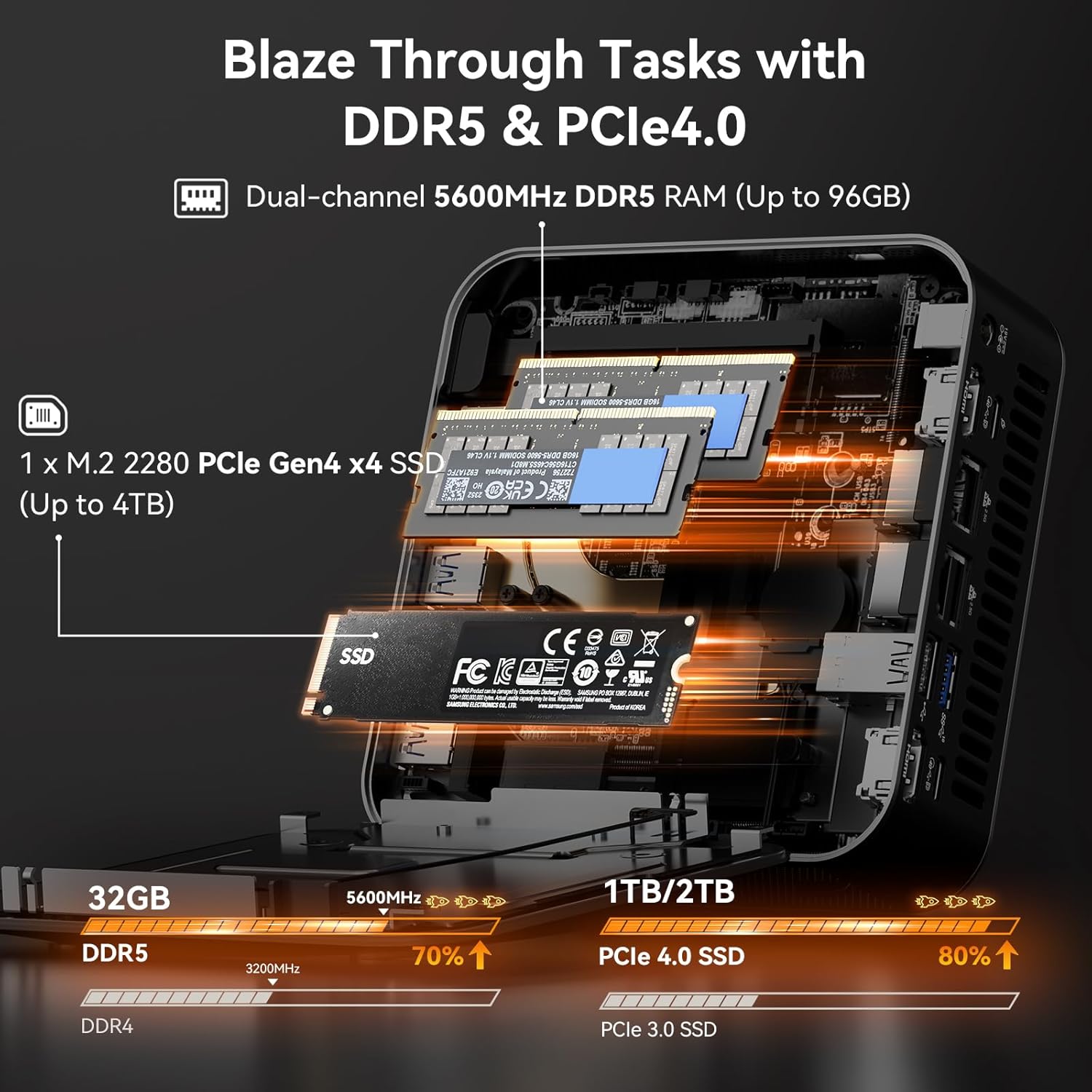
➋ [ Up to 96GB RAM and 4TB SSD ] This mini desktop comes with 32GB of RAM and supports dual-channel DDR5 5600MT/s SODIMM expansion up to 96GB for seamless multitasking. For storage, it includes a 1TB M.2 2280 NVMe Gen4*4 SSD, fully compatible with Gen3 SSD,expansion up to 4TB, ensuring fast data read and write speeds.
➌ [ Global Certifications & 3-Year Warranty ] The GEEKOM mini pc A8 Max features a durable aluminum chassis that combines robust construction with a sleek, modern aesthetic. Rigorously tested and certified against global standards including CE, FCC, CB, CCC, SRRC, RoHS, the A8 Max guarantees quality and security for enterprise deployment. Backed by a 3-year limited warranty covering design and workmanship defects, plus dedicated professional support, we ensure your complete peace of mind throughout the journey.
➍ [ Dual 2.5G LAN for Superior Networking ] Designed for business environments, the A8 Max mini computer features dual 2.5 Gbps Ethernet ports ideal for deploying firewalls, soft routing, network storage, and load balancing. With bandwidth aggregation technology maximizing data throughput, it delivers stable, high-speed connectivity for office networks and IT infrastructure.
➎ [ Secure USB4 & Comprehensive Ports ] The GEEKOM A8 Max features a 40Gbps USB4 port delivering Oculink-level bandwidth with encrypted transfer and hot-swap support—connect eGPUs, high-speed storage, or multi-display setups without internal modifications. Also includes 5× USB 3.2, dual Type-C, dual HDMI, and an SD card reader for effortless peripheral expansion and 8K output. Plug and play for total efficiency.
➏ [ Meet IceBlast 2.0 Cooling ] Dual copper heat pipes transfer 210% more heat, paired with a 2x larger silent fan (vs competitors) and vortex airflow, plus an enhanced heatsink specifically covering the CPU module, delivering powerful cooling with minimal noise.
Customers say
Customers find the mini PC to be a great little computer with easy setup, quiet operation, and compact size. The performance receives mixed feedback – while some say it does its job without issues, others report crashes for no reason. Customers disagree on the speed, with some finding it fast while others note it’s not as quick in games. The connectivity and temperature control aspects also receive mixed reviews.
13 reviews for GEEKOM A8 Max Mini PC[Ultimate Performance Edition] with AMD Ryzen 7 8745HS(Beats 6800H) Dual LAN Mini Computer 32GB DDR5 & 1TB SSD(Expandable), Radeon 780M Mini PC Windows 11 Pro/USB4/8K/ SD Slot
Add a review
Related Products


Original price was: $649.00.$599.00Current price is: $599.00.

Probe –
Runs cool and quiet.
Reviewing A8 Mini with Ryzen 7. Since this unit may be equipped with the more powerful Ryzen 9 it also has the enhanced fan and “dual copper heat pipes”. I was hoping that this would run cooler and quieter than my old NUC mini which it replaced. Wow, does it ever….minimal fan / extremely quiet. I would buy it again.
Duane L Yoshioka –
Great mini PC
Awesome
Golly Llama –
Dynamite comes in small packages
Have to admit it runs as well as the tower I paid $1200 for.
CT Buyer –
Solid computer
Exactly what I wanted. I have multiple screens (3), cameras, microphones, keyboard, etc ⦠no need to buy more. I did buy a usb hub as I wanted all connections to come from the back.Works great!
Sherry Whitfield –
When it boots up, itâs a good machine.
2nd UPDATE:This is a quirky little computer. I had initial trouble getting it to recognize my keyboard but resolved it with a different keyboard. It seemed fine and then boom, it wouldnât boot. I treated all kinds of things to get it working but to no avail. I walked away from it and when I came back I tried one more time⦠and it booted right up.What the heck?Itâs running fine now, but I am really leery itâs going to stop working wheel I am ion the middle of working on something. Just in case itâs not the computer, Iâm going to get all new cords and see if one of the old ones has an unknown issue.When it works itâs great so Iâll give it 4 stars. Iâm taking away a star because when it doesnât work good luck in getting help.And for sure donât buy from any place but Amazon or their website – because evidently there are a lot of counterfeit geekom mini computers out there. I would not take that chance!1st UPDATE: After reviewing this and feeling happy with it, today it will not boot. Tried cycling the power, etc.It’s no longer exceeding expectation, it’s living up to my pre-purchase fears…I’m ready to dump it but will reach out to tech support first.************Before catastrophic issue with booting…I was a bit skeptical about this tiny computer but decided to give it a try. So far it is exceeding my most optimistic expectations and then some!It was a little tricky to set up at first – until I found out that it doesn’t like my old MS natural ergonomic 4000 keyboard. Once I connected a new wireless ergonomic keyboard it worked fine.However, my very old MS Trackball Explorer works great with USB connection.Once I had the new keyboard connected it proceeded to download and update Windows 11 with no issues. IT took about an hour, and it did its thing without any issues. It got warm but never overheated. I directed a little fan onto it, just to be safe, and it cooled way down fast.It has more than enough USP ports to do what I want. It freed up a ton of space on my desk. It came with all of the bolts and other items to hang it on a wall or screw it behind a monitor. It certainly seems tough enough to last for a few years. It loads fast – much faster than my old set up.For the money and what it offers, this was a bargain.
Victor Workinger –
Geekom with AMD
Works great. adjusting to Win11 after win 10 and Firefox. machine working great .
J Barth –
Value and Performance – Excellent!!!
Excellent mini pc. Performance is beyond expectations. Value for the money exceeded expectations. Connectivity is perfect. Set up and running in minimal time. Quiet even under heavy processing. And . . . it looks great!
Berry –
It had one job
I bought it for one reason only. To edit videos with CapCut. It not only freezes, but it scrambles the brains of my TV so it does not work unless unplugged for 30 minutes.I have sent two requests for help from Geekom, with zero response.Sadly, I will be returning it and trying a different brand. But I will check service reviews first.
Silke & Robert Feldmann –
Super klein, wertig und schnell.Nach Aufbau und Anschluss noch das vorinstallierte W11 vervollständigen (es werden ein paar Updates gezogen) und aktivieren (Anmeldung mit MS Konto reicht), fertig. Im Normalfall hört man von dem Teil nichts. Aber es laufen auch keine besonderen Anwendungen. Mails, Office, Finanzen, Zoom oder Discord, das war es. Ganz selten hört man den Lüfter ein bisschen rauschen, stört aber nicht und der kleine steht quasis direkt neben der Maus.
diamond –
ã»ã¼ç¡é³ã§å¦çé度ãéãå®ç§ãªãã·ã³ã§ãã
lec –
matériel silencieux, puissant, ne prend pas de place et est très bien équipé côté vidéo et ports USB.Equipé de Windows 11, les maj se font rapidement et le site de l’éditeur fournit les pilotes en cas de maj.Je recommande
azu-moko –
梱å ç¶æ ã«ã¯ä¸å®ãããã¾ãããåé¡ãªãä½åãã¾ãããèµ·åãæ©ããµã¯ãµã¯åãã®ã§å¿«é©ã§ããä»ã®æ¹ã®ã¬ãã¥ã¼ã§çµæ§çºç±ããã¿ããã§ããããç¹ã«åé¡ã¯ããã¾ããã念ã®ããå¾ããããã¡ã³ã§é風ãã¦ãã¾ãã
Monacus –
Schneller und leiser PC, der meinen Anforderungen bestens genügt. Das Einrichten der SSD (Partitionierung) war mit Hilfe des Gerätemanagers problemlos und schnell möglich (gute und präzise Info auf Nachfrage vom Hersteller erhalten).