

Fnatic STREAK80 LP White TKL Mechanical Low Profile Pro Gaming Keyboard, Speed Switches with Short Key-Travel, LED RGB, PBT Keycaps, Silent PORON Foam, US ANSI Layout QWERTY
$53.99






Price: $53.99
(as of Oct 05, 2025 10:21:09 UTC – Details)
Product description
The video showcases the product in use.The video guides you through product setup.The video compares multiple products.The video shows the product being unpacked.
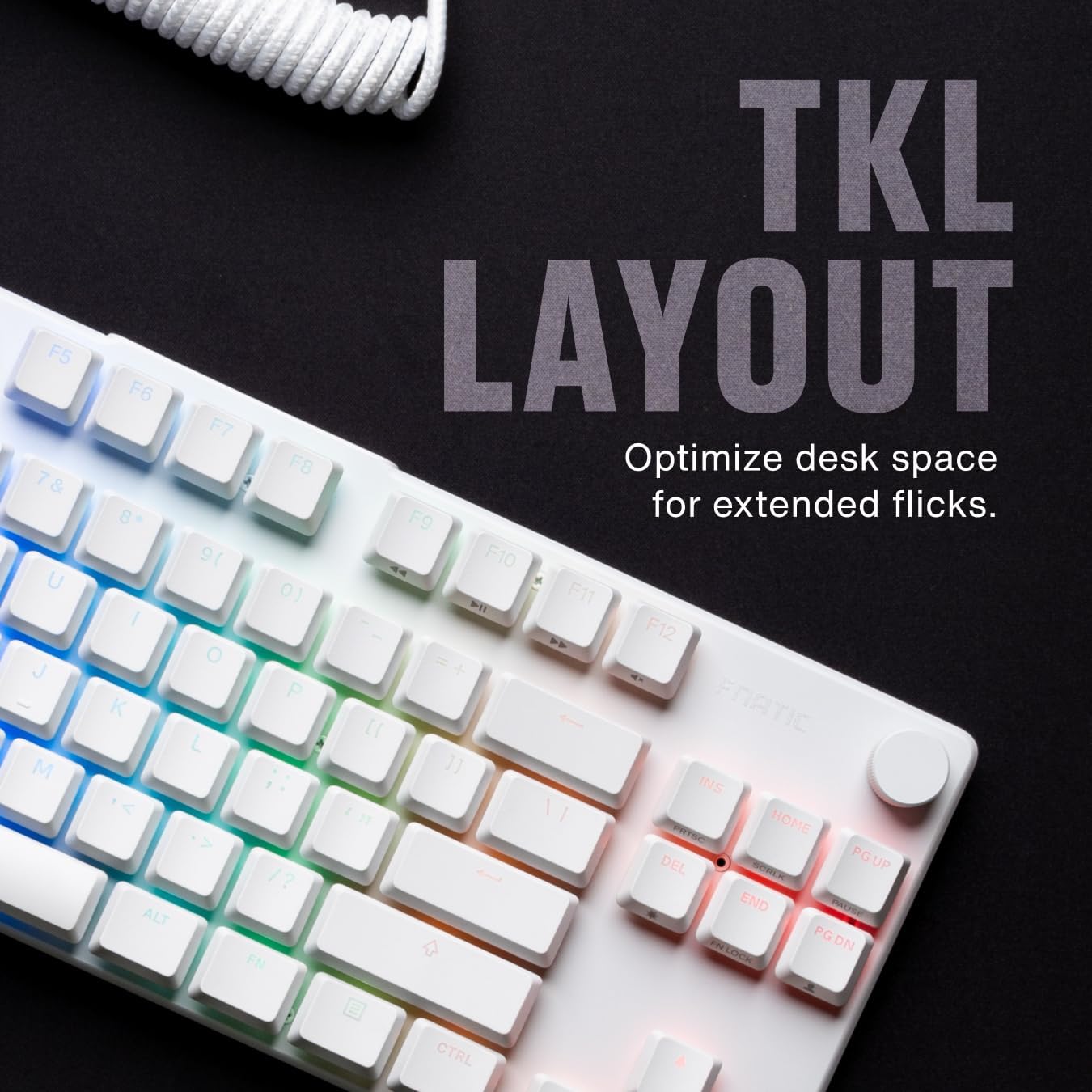
 TKL LAYOUT
Optimize desk space for extended flicks.
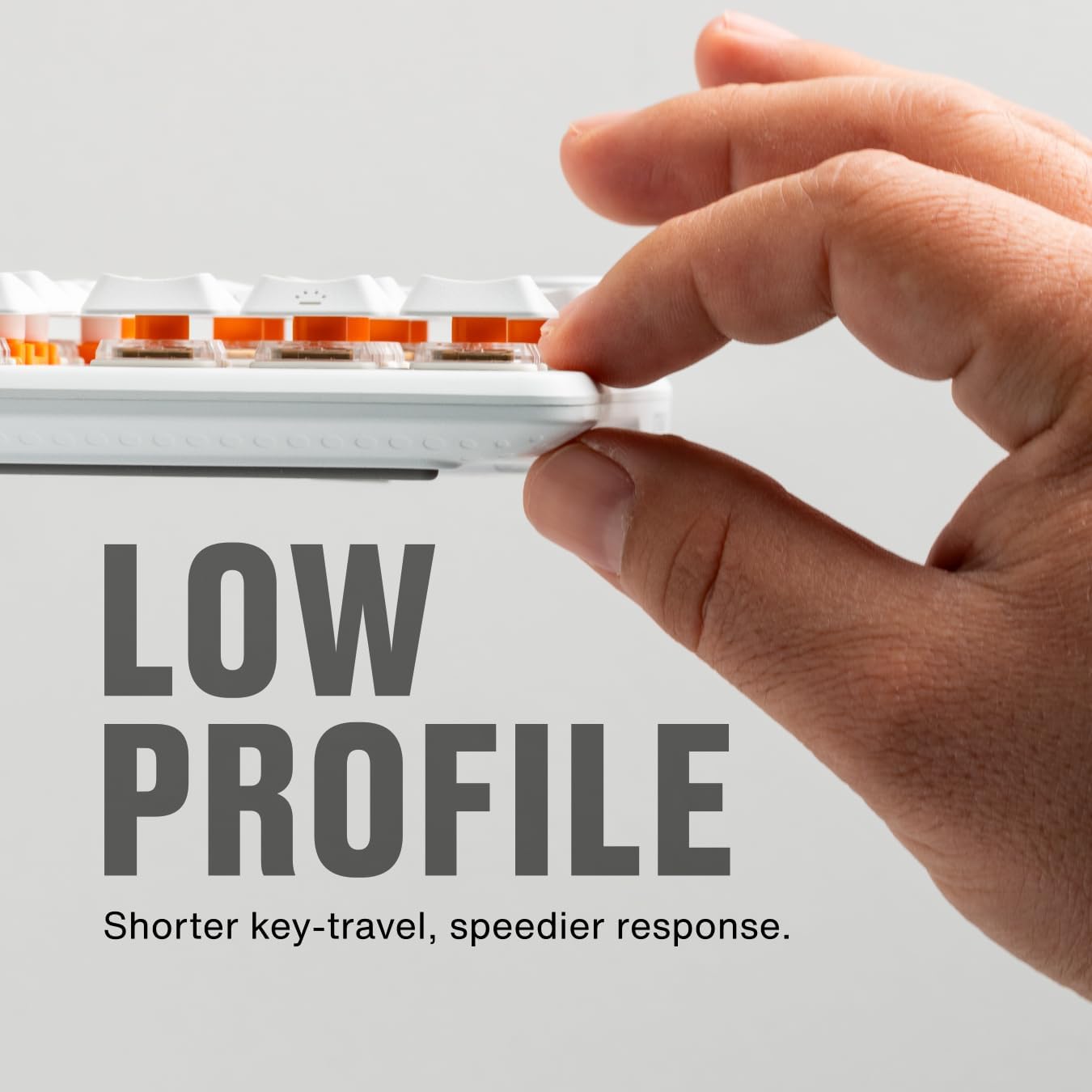
 LOW PROFILE
Shorter key-travel, speedier response.
 INSTANT CONTROL
Volume up, down, and mute all at your fingertips.
 COILED CABLE
Enhance your desk with our elegant coiled USB-C cable.
 TEXTURED PBT KEYS
Premium low-profile Doubleshot PBT keycaps resist oils and shine.
1 TKL LAYOUT
2 LOW PROFILE
3 INSTANT CONTROL
4 COILED CABLE
5 TEXTURED PBT KEYS


TECHNICAL SPECIFICATIONS
Size 353mm x 130mm x 25mm Weight 585g +-5g Format 80% (TKL) Cable USB-C, Detachable Keycaps Premium Doubleshot PBT Connectivity Wired Switches Custom Low Profile Fnatic Linear Speed Switches Switch Actuation 1.0mm Switch Total Travel 3.2mm Lifespan 50M Polling Rate 1,000Hz MCU 32-bits High-performance VT32F0283 (Cortex-M0 based, 72Mhz) by Vega Integration Corporation Colour White Layout ANSI (US) Lighting 16.8M Colors, LED Compatibility Windows, MacOS

COMPARE WITH SIMILAR ITEMS
Add to Cart
Add to Cart
Add to Cart
Customer Reviews
4.3 out of 5 stars 1,260
4.3 out of 5 stars 1,260
4.3 out of 5 stars 1,260
4.3 out of 5 stars 1,260
Price
$53.99$53.99
$46.99$46.99
—
—
Switches
Custom Low Profile Fnatic
Fnatic SPEED Low Profile
Fnatic SPEED Low Profile
MX Cherry Silent Red
Switch Feel
Ultra fast, Linear
Ultra fast, Linear
Ultra fast, Linear
Fast, Linear
Lifespan (keystrokes)
50 million
70 million
70 million
>50 million
Keycaps
Premium Doubleshot PBT
ABS
Doubleshot PBT
ABS
OP Software
Yes
Yes
Yes
Yes
Pre-Travel
1.0mm
1.1mm
1.1mm
1.9mm
Total Travel
3.2mm
3.2mm
3.2mm
3.7mm

TENKEYLESS DESIGN – Maximize desk space with the STREAK80 LP—an elegant, low-profile tenkeyless keyboard featuring a sleek design, sturdy aluminum top case, dedicated F-row, and volume wheel. Only available in White US ANSI.
LOW PROFILE EVERYTHING – Swift response with shorter key-travel: Custom low-profile switches offer 1.0mm actuation distance, 20% reduced travel for quicker actions. Slim keycaps and ergonomic design ensure comfort in long gaming sessions—no wrist rest required.
BUILT FOR PROS, APPROVED FOR ALL GAMERS – Designed by esports pros for peak performance. Our gear, crafted with firsthand input from the best players, stands up to the toughest tests, representing gaming excellence from design to the biggest stage.
TEXTURED PBT KEYS – Premium low-profile Doubleshot PBT keycaps resist oils and shine.
STABILIZERS & SWITCHES – Rattle your foes, not your keyboard. Enjoy pre-lubricated stabilizers and switches right out of the box.
INSTANT CONTROL AT YOUR FINGERTIPS – Forget those pesky volume menus – volume up, down, and mute all at your fingertips.
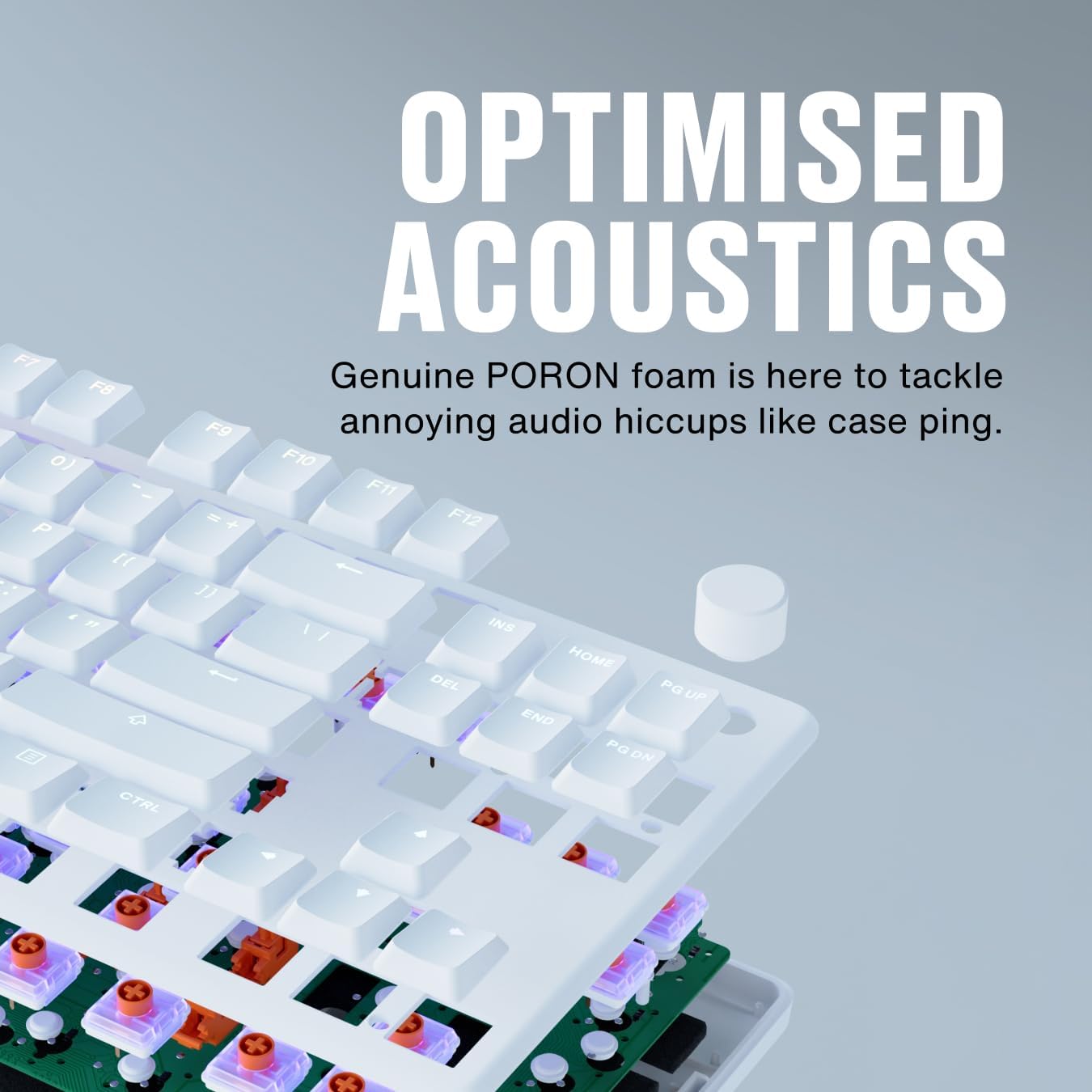
OPTIMISED ACOUSTICS – Experience typing bliss with the STREAK80 LP – its genuine PORON foam is here to tackle annoying audio hiccups like case ping, letting you type in peace.
LESS KEYCAP, MORE RGB – FNATIC’s custom keycap profile not only expels vibrant lighting from the switch’s side but also evenly illuminates your entire desk setup for a brilliantly lit experience.
Customers say
Customers find this keyboard to be a great mechanical keyboard with soft, satisfying key presses and solid build quality. They appreciate its compact size, LED color options, and consider it the best mechanical keyboard for the money. The functionality receives mixed reviews – while some say it works better than expected, others report it stopped working properly after 8 months.
8 reviews for Fnatic STREAK80 LP White TKL Mechanical Low Profile Pro Gaming Keyboard, Speed Switches with Short Key-Travel, LED RGB, PBT Keycaps, Silent PORON Foam, US ANSI Layout QWERTY
Add a review
Related Products


$53.99

ClockRocket –
Great keyboard! Possibly the best I have used!
Update 4/6/2021: After writing my recent review, I noticed that there are not that many of these keyboards left and at the this time it appears that if you want a miniStreak, you have to get MX Silent Reds. I thought I could use a change of pace, so I ordered one. The silent red switch is a game changer! It is significantly quieter than the MX Browns, and it sounds nicer too. For gaming, I definately prefer the linear feel. For typing, it took a while to get used to, but I increased my WPM from around 60-65wpm to a consistent 70-75wpm.I also went down a rabbit hole with mechanical keyboards and modding them. In the week I have owned the Silent Red miniStreak, I have added foam to the inside of the bottom plate, lubed the switches and stabilizers, added foam to the spacebar, and added a set of the Glorious PBT keycaps.I have never used a truly premium custom board, but I imagine this is a taste of what that is like. If you are thinking about getting one of these, I would snap one up now. Best Buy also has a few left for around $75. At that price, you are getting a great feeling keyboard, relatively small, and very durable.Last point, my old MX Brown is still kicking. I gave it a really thorough deep clean, performed the same mods, did a function test and put it in the closet as a backup. I really really hope Fnatic gets back in the peripheral game with some vigor. It seems like they make great gear when they put their mind to it. Fnatic Clutch 3 Ultralight mouse would be top on my list lol.Update 3/16/2021: I have been using this keyboard since May 2019. Since March 2020, I have been using this keyboard all day long for work, and lot of times in the evening for gaming. It has not skipped a beat, never lost programming, no dead keys. It still works like its brand new. I also have it hooked up to a KVM switch to go between my work laptop and my gaming PC. It never hiccups when I switch it over and it has probably been switched at least 500 times in the last year. I think I am going to keep using it until something breaks just to see if/when that happens. Side note: I do clean it with an air compressor and alcohol wipes about once every six months.Let me start by saying that I love this keyboard. This is my second TKL keyboard (I also have a Cooler Master CK530 w/ Gateron Reds). This is probably my 10th mechanical keyboard as well. So I have used quite a few over the years and I have a pretty good idea of what I like and don’t like.I am just going to hit a few bullet points on what I really liked and add a little tip at the end:Pros:+Great software! It is really easy to use and doesn’t need to run all the time. Setting up my lighting scheme was easy, and it was easy to setup different profiles as well. You can easily switch profiles on the keyboard too.+Removable cable. Very handy to have. I can move the entire keyboard out of the way quickly and easily if I want to use my entire desk. Alternatively, you could get a second USB-C cable and easily travel with it.+Low profile body. This makes for a very comfortable keyboard. I didn’t think it would matter at first, but it really is a game changer for me.+Very compact. It’s a TKL keyboard, so it is already freeing up some extra space for your mouse. However, it doesn’t have any extra fluff around the edges, so you get just that much more space for your mouse.+Amazing stabilizers. Any stabilized key, especially the spacebar, are a joy to use. This is another thing that I noticed early, but didn’t put much thought into. Now, I really don’t want to use a mechanical keyboard that doesn’t have this level of stabilization.Cons:-Caps lock indicator is kinda hard to see. Maybe move it up a few millimeters?-Doesn’t seem like there is a way to dim the keyboard other than going into gaming mode. Maybe this can be fixed with a software update?-While there are media keys when using the FN button, I would really love to see a dedicated volume up/down key.-I couldn’t find a comfortable position to use the wrist rest. It isn’t really necessary anyway, and your mileage may vary.Pretty good right? I think so, easily the best keyboard I have bought since the original Logitech G710+. Next time I feel like I need a full size keyboard, I am just getting the bigger version of this.I would suggest you shop around though. Certain other blue and yellow stores have this keyboard for $90 at their regular price (or less if you go open box). Just something to keep in mind.
Leonard Washington –
Streak (not mini or Rush): Best keyboard I’ve ever owned. (Despite the cord)
***This review is for the Streak model.***This average star-rating for this listing is meaningless, because the the reviews for different products are all mixed together.The very least you could expect from a list of customer reviews is that they’re for the product that they’re listed with.And even if reviews for different products are all mixed together…Maybe there could be a “filter” option where the user could select the product of interest?Unfortunately, that’s not the case.Buyer beware: Pay attention to what product the reviews are for. Apparently the job of determining relevance has been out-sourced to you.***Update***I took it upon myself to remove the cable and splice the passthrough port directly to the board connector.Now I can use any USB cable I want.(See attached photos of my modification.)***End Update***I have the brown switches, because they come recommended for work/general-typing usage cases. I don’t game anymore, so I can’t give any input on that application.The build quality of this keyboard is excellent; and in my opinion, the price is justified.It’s durable, 100% responsive, and visually remarkable.Having a built in scroll wheel that defaults as a volume control is awesome. I find it so useful, that I’m of the opinion that this should be a standard feature in all keyboards.There is only one thing that I don’t adore about this keyboard: The cord.In fact, I detest it.There’s nothing wrong with it per se, it’s just that it’s obnoxiously bulky.It’s completely over-engineered for me. I acknowledge that it’s enormous size and industrial-strength build may be exactly what others are looking for.For instance, it probably holds up well in gaming scenarios where emotions run high and the equipment may be subject to extreme physical forces. (E.g. Rage-quit tantrums)But for me, it’s just a ridiculous albatross attached to the the neck of an otherwise sleek and efficient HID.The fact that I still use this keyboard exclusively is a testament to its quality.(I’d never tolerate the insanity of the cord in anything less than fantastic.)
Jason M. Rizos –
Demystifying Mechanical keyboards
So yes, I like this very much. After spending years just giving up on shopping for a mech keyboard after agonizing over pretentiousness from reviewers, I finally purchased this one. Overall, let’s look at features instead of getting bogged down in the switch debate. First off, the price is pretty darn good, considering you get full on cherry mx switches. USB input (for wireless mouse), responsive and easy volume knob–two essentials you don’t want to go without. I would prefer dedicated multimedia controls (play/pause/tracks) but the easy function key suffices. Build materials are solid (people complain about being heavy? honestly?) Wrist-rest is great, keycap texture is fine (though I don’t know what to compare it to but cheap keyboard plastic). The gamer-forward stuff is kind of immature, but I do like the backlight and customization options, I don’t find it annoying or distracting, especially when turned down to slow.I had to return this for a cherry silent and customer service helped me out within HOURS of emailing. The cherry silent is a dream, it is VERY silent, and though the keys are firmer, I find it better as the action is better than the regular. I bought it for typing and I find the input terrific, but have only used a membrane board in the past.Overall, if you want a “serious” mechanical keyboard you can’t go wrong with this board, great price, great features, though I don’t know what I’m missing when it comes to those fancy $200+ boards.
Brennan P. –
As someone who buys a lot of keyboards and even makes a couple custom ones I was really suprised by this keyboard. Its easily the best premade in both sound and feel, the quality was very suprising to me considering this isnt an expensive board. My only regret is not getting it in white to match my mouse.
Cliente Amazon –
Premetto che non sono un gamer, ma un programmatore. Avevo bisogno di una tastiera nuova perchè ormai la mia vecchia tastiera (oltre 15 anni) ha deciso di abbandonarmi. Prima avevo una 104 tasti e sinceramente ho sempre trovato che occupasse troppo spazio sulla scrivania quindi ho optato per una TKL. Dopo varie ricerche la mia scelta è ricaduta su questa miniStreak (layout US, switch Cherry MX Brown) ed è risultata una scelta azzeccata. Veramente robusta e compatta (alluminio e plastica), ottimo il software anche se ancora non è completo. La scrittura è buona e piacevole, l’illuminazione anche. Allo stesso prezzo della concorrenza, Fnatic offre qualcosa in più, come i tasti dedicati per il blocco del tasto FN, quello per mutare il volume, quello per mutare il microfono (UTILISSIMI A MIO AVVISO), il tasto antidistrazione e il poggia palmi (regolabile, molto comodo al tatto). L’unica piccolissima pecca è che i cap dei tasti sono di qualità standard (sia chiaro: sono buoni e belli da vedere). Rispetto alla tastiera, la fanno sembrare leggermente meno premium, ma tutto sommato non sfigurano affatto. Fortunatamente ha dei cap standard (a differenza di Corsair) quindi facilmente sostituibili per un costo contenuto. Ultima nota è che per la tastiera con layout IT vi sono solo gli switch silent rossi, per chi volesse switch diversi deve optare per un layout US (non è la fine del mondo, anzi).Considerazione finale: ottimo prodotto, qualità /prezzo vantaggioso. Consigliatissimo, anche per chi, come me, non è un gamer!
Dave –
I can type pretty fast, 90-100wpm, so wanted a keyboard that didn’t hinder this but was still great for gaming. The Fnatic replaces a 20 year old Microsoft Internet Keyboard and it’s like stepping up from an early Golf to a brand new BMW. Feels great, the Cherry keyswitches are very smooth, excellent for gaming. The only tiny problem I can find is that when the lighting is turned up to max brightness there is a very slight whine coming from the keyboard (barely noticeable, and I have a nearly-silent PC); but this was anyway too bright for me. When I turned it down to 50% there was no noise to speak of anymore. With a gaming PC and many high-powered fans I guess you wouldn’t hear anything even at 100%.Best features: the Fn lock and the Competition mode (the latter of which I use to change from “gaming” keygroup colors to a solid color). Volume control is handy too.
RENATO RAMONDA –
La tastiera è quello che cercavo: meccanica, con layout TKL che la rende compatta, senza troppi fronzoli. Materiali ottimi (la placca in alluminio le dà un peso e una solidità ragguardevole. La riga dei tasti funzione a doppio uso (come sui laptop) permette di avere i tasti media (volume, Play/Rev/FFWD) senza occupare spazio; i tasti essenziali sono presenti (home/end/PgUp/PgDown) e accessibili.Gli switch Cherry MX Silent Red hanno un buon feeling a livello tattile, con una corsa più profonda delle solite tastiere “di serie” dei PC da ufficio, senza avere alcun effetto di “click” (né all’udito, né al tatto: se cercate una tastiera “clicky” vi conviene scegliere una versione con switch Cherry diversi). Da digitatore dattilografico a 10 dita devo dire che la risposta è buona e piacevole. E il rumore prodotto dalla digitazione è sensibilmente MINORE di quello di una classica Logitech K330 (che non ha click ma tende a produrre rumori tipo “chick-chack” con la plastica dei tasti.Gli effetti luminosi sono molto vistosi e abbastanza divertenti… ma fortunatamente e’ facile scegliere una modalità più sobria per chi come me l’ha comprata per avere una tastiera meccanica per il lavoro e non per i LAN Party.Il software di gestione (in beta e non supportato) viene descritto come “cloud based” ma è una bugia (è un banale programma .NET), e “cross platform” significa “Windows e forse OSX”… ma di nuovo, fortunatamente non serve a molto se volete solo usare la tastiera in maniera “normale”: potete scegliere tra 8 schemi di effetti luminosi direttamente con la tastiera. Il software serve per personalizzazioni più spinte che sono simpatiche ma non essenziali.
imako –
ãã¼ãããã¡ã¤ã«ã§60%ã®ãã¼ãã¼ããæ¢ãã¦ããªãããä¸æãfnaticã®è£½åã¯çãæã«æãå±ã製åãä½ã£ã¦ããããåä½ããæç´ãä»ãã«ããæé¤ããããç´ æã®ãã¼ãã£ããã«å¤æ´ãããUSBã±ã¼ãã«ãã«ã¼ã«ã³ã¼ãã«å¤æ´ããã¦ããã軸ã®éç©æ§ã¯é«ãããã¢ã¯ãã¥ã¨ã¼ã·ã§ã³ãã¤ã³ããçãã®ã§åå¿ãæ©ããããã¸ã§G913ããããã¨æãã