

HP EliteDesk 800 G2 Desktop Mini Business PC, Intel Quad-Core i5-6500T up to 3.1G, 16GB DDR4, 240GB SSD, VGA, DP, Windows 11 64 bit (Renewed)
$121.11


Price: $121.11
(as of Sep 19, 2025 15:45:04 UTC – Details)
Product description
Add to Cart
Add to Cart
Customer Reviews
4.4 out of 5 stars 953
4.1 out of 5 stars 86
Price
$121.11$121.11 $131.00$131.00
CPU
Intel Core i5 6th Gen 2.5 GHz Up to 3.1 GHz Intel Core 6th Gen 2.7 GHz Up to 3.3 GHz
RAM
16G DDR4 16G DDR4
HDD
240G SSD 512G SSD
OS
Windows 11 Pro Windows 10 Pro 64 Language Support English/French/Spanish
USB 3.0 Port
6 x USB 3.0 6 x USB 3.0
USB 2.0 Port
N/A 4 x USB 2.0
DP port
1 2
VGA port
1 1
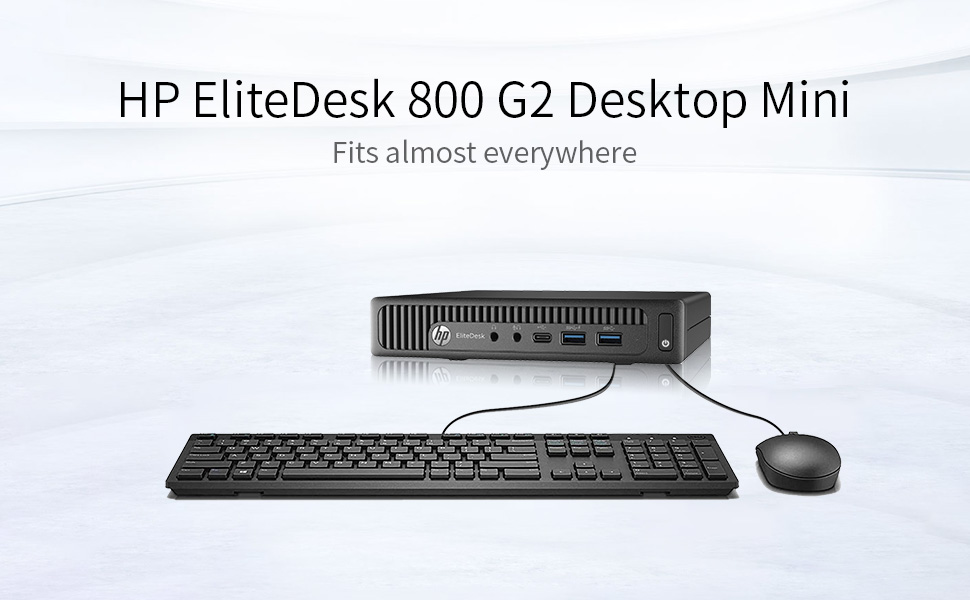
Specifications: Processor: Intel Core i5-6500T 2.5 GHz Graphics: Integrated Intel HD Memory: 16GB DDR4 Hard Drive: 240G SSDOperating System: Windows 11 Pro 64Ports: 6 External USB 3.0 ports (2 front, 4 rear); 1 RJ-45; 1 VGA; 1 DisplayPort;Included in the box Computer; Power Cord; USB Keyboard; USB Mouse.
This Certified Refurbished product is tested and certified to look and work like new. The refurbishing process includes functionality testing, basic cleaning, inspection, and repackaging. The product ships with all relevant accessories, a minimum 90-day warranty, and may arrive in a generic box. Only select sellers who maintain a high-performance bar may offer Certified Refurbished products on Amazon.com.
HP EliteDesk 800 G2 Desktop Mini Business PC, Intel Quad-Core i5-6500T up to 3.1G, 16G DDR4, 240G SSD
Includes: USB Keyboard & Mouse, Microsoft office 30 days free trail.
Support 4K (3840×2160) display, high quality image quality gives you the best visual enjoyment.
Operating System: Windows 11 Pro 64 Bit-Multi-Language Supports English/Spanish/French.
Customers say
Customers find the mini PC to be a great workhorse that’s extremely fast and offers good value for money. They appreciate its small size, with one customer noting it performs like a big computer. The functionality and durability receive mixed reviews – while some report it works flawlessly, others mention it stopped working, and while some find it lasting, others report internal hard drive failures. The WiFi connectivity and port connectivity aspects also receive mixed feedback, with some customers noting the built-in WiFi and multiple USB ports, while others mention missing features like HDMI ports.
9 reviews for HP EliteDesk 800 G2 Desktop Mini Business PC, Intel Quad-Core i5-6500T up to 3.1G, 16GB DDR4, 240GB SSD, VGA, DP, Windows 11 64 bit (Renewed)
Add a review
Related Products


$121.11

momstufz –
Way faster than specs would tell you. Windows 11 upgradable. GREAT little PC!
I got this new a couple of years ago, to replace a terribly old Mac that couldn’t keep up anymore. I’ve been astonished at how fast this little PC has been. The specs don’t really tell you the whole story. The folks at HP managed to optimize this machine so that it’s just blazing fast compared to other computers I’ve had that were closer to top of the line in their day. It may not hold up well for instensive things like video procesing or bulk graphic editing in Illustrator, but for the vast majority of productivity type tasks, this tiny PC is perfect. You’d never know you’re on a mini PC except the fact that it’s stone cold quiet and doesn’t have great HD space (just get a 500GB flash drive, they’re cheap). With 7 USB ports and a 2 DisplayPorts, even the lack of HDMI isn’t a very big deal. Thunderbolt would be nice but there are workarounds. I’ve got this thing hooked into a 43 inch 4K monitor and everything looks beautiful. Mouse is a bit slower on the big screen, but that’s it.Upgrading to Win 11 was as easy as upgrading the TPM to 2.0 w/ HPs official tool, and using MSFT’s registry override published on their site with instructions how to install Windows 11 on machines deemed incapable (Windows will tell you the CPU on this machine isn’t up to par, but that’s ridiculous). Then during the ISO ugprade you need to selected advanced and turn automatic updates during installation OFF or the install will cut out. Also, all the warnings about how if you upgrade on a machine deemed incapable will make you ineligible for future Windows updates are totally bogus – updates work fine. Windows 11 is way better than 10, especially for multiple monitors. I ran the Performance Monitor app in Windows 11, and not only did this machine pass with flying colors, it scored an 8.7 in the CPU area – where 5 is a passing score. So not only can the CPU handle Windows 11, it handles it a lot better than plenty of the machines deemed capable of Win 11.Buying one of these for $110 refurbished for office, home, or school is a no brainer.
Budadsed –
Great value pc!
Worked as advertised. Came with wired keyboard and mouse. Windows 11 pro was installed. The Wi-Fi is usb with antenna, which works fine. It looked brand new with no dings or dents. Was up and running in 30 minutes. One caveat, the Intel HD530 graphics driver is 2022. It still works with Windows 11, but I do see occasional flicker.
JP Powers –
Pretty decent after some tweaking
So I picked up one of these to use as a Raspberry Pi alternative for some small IoT services around the house. I had a NVMe SSD in another system I should be able to drop into this and boot, which mostly seemed to work, but I was having some strange issues that took a while to figure out.So, out of the box, I went ahead and opened it up and unplugged the SSD included. I don’t need Windows for my needs and would rather not have it numerated in Linux or anything, so I just unplugged it. I plugged my prepped NVMe in and it all seemed fine.Booted into the BIOS, went thru resetting some things, and upon save & resetting the BIOS… it wouldn’t boot. I kept getting “RESET SYSTEM” messages and it just kept rebooting. I couldn’t get it back into the BIOS either.At first I figured I did something wrong in the BIOS and tried to reset the CMOS, but that didn’t really do much either. I was able to get into the BIOS once, didn’t change anything, and it immediately started back into a RESET SYSTEM loop.I took it apart completely and noticed the Wifi antenna were seemingly damaged. It looks like there are a couple of places where the antenna has been stripped on purpose, exposing the inner metal shielding to the bare metal of the chassis. I didn’t think it was likely causing a short but I did see some others reporting such a problem. I’m not using the wireless so I went ahead and removed it. Problem persisted.After a bit more troubleshooting I figured out if I plugged a second keyboard in and spammed F12 on both I was able to get into the BIOS, and from there I set the boot delay timer to 5 seconds… and it boots into Linux very consistently now.I say all this to hopefully help anyone else that picks up one of these for homelab type things: Ensure the boot delay timer is set, because it seems like the HP BIOS can’t kick over to GRUB otherwise. Super weird, but hey, it ends up working fine.
Curt Wuollet –
A great average desktop.
I spent the last few work years developing automation using raspberry pi, so it made sense to have it as my daily drive and desktop. Now retired, I wanted to see how the rest of the Linux world was doing. I looked through my motley collection of old computers and decided I needed something more modern, nothing crazy, I’m not a gamer or video producer. I just needed a commodity desktop. On that front, not much has changed for years. I looked at what I could get new locally or online and wasn’t impressed. But I did see huge numbers of these on sale at attractive prices. Off lease doesn’t scare me I have the tools and knowledge to build PCs if needed. So, I found what seemed the best deal, Amazon renewed so I could send it back if hopeless. For $100, these old business models are pretty much on par with the new budget models I was looking at.So, what did I get? Slightly more than I ordered, this one had a 1tB ssd and it does have WIFI and Bluetooth internal. The ssd had been running for 5 years and was down to 9% life according to Crystal Diskinfo. But, it had Windows 10 Pro on it and works fine. The external antennas were missing but both WIFI and Bluetooth work OK. I didn’t really have to do anything. But I added a nvme M2 ssd and put LinuxMint on it. I left the Windows on the original drive and if it fails eventually, no big deal, I don’t use it anyways. But, it’s a great deal for what I needed and more than fast enough as a Linux desktop. I am pleased, and as someone who has been in the game since before PCs, that’s saying a lot. I would recommend if for someone who just needs an average desktop.
anon –
I bought it from Advanced Skytech CA. They did a good job cleaning it. I received a keyboard, mouse and a USB-wifi adapter (decent according to Amazon reviews). The keyboard is also decent, though a cheap model.The computer I received had integrated Wifi and 2 DisplayPorts (both non-listed, so I guess I got lucky).The computer is very capable. With its i5 CPU and 16 gigs of memory it can do all typical tasks: video watching, editing, brwosing, spreedsheets, etc (and except for gaming). It can run a display at 4k without any problems (tested with Youtube at 4k resolution using WiFi). I was able to install Ubuntu 22.04 without any problems using software RAID 1 (nvme and SATA, though the SATA becomes the bottleneck). It seems to be as powerful as a top laptop from 5 years ago (check the CPU benchmarks for its i5-6500T.The fan is almost silent. You can hear it if you are right next to it in an otherwise silent room. Of course, under heavy loads it becomes noisy.With 16 Gbytes, ability to have 2 storage devices inside, Wifi, 2 display ports, lots USB-3.0 ports, it is great value. The only negatives: its CPU is not windows 11 approved (though it is capable) and it only has display port and VGA outputs (thus you need an adapter for HDMI).Highly recommended as a light-work desktop or a small server.
Jorge @ –
Equipo de hace 6-7 años pero en excelente estado y aun da batalla, por el precio de 3k vale totalmente la pena.En mi caso venia con SSD M2 de 256gb de una marca que no conocÃa pero funciona muy bien y es mucho mas rápido que los SSD Sata. Viene con 16gb de Ram Sk Hynix que es excelente marca en mi experiencia. También venia con un Wifi USB teclado y ratón.Le instale windows 11 desde usb sin problemas, solo tuve que bajar controladores desde la pagina de intel pero los encuentra de manera automática.Como actualización le puse un SSD Crucial y un I7-6700T (tiene que ser el T para que funcione a 35w igual que el i5) y funciona de maravilla.
Manuel –
Got it for my dad, works perfectly, comes with Win10, wireless and bluetooth, no noise, my dad was happy… only issue is when i tried to set it up, windows couldn’t be set in french… that my the only “issue” if you call that an issue
Carlos Alonso –
Todo funciona correctamente, muy buen estado fÃsico, la descripción es correcta, su desempeño es muy bueno, no tuve problemas de controladores, le reinstalé el S.O. pues venÃa en inglés, por el precio vale cada peso que pagué, recomendable al 100%.No trajo tarjeta wifi y a cambio te mandan un adaptador USB para conectarte inalámbricamente que ni controladores me pidió, excelente.El teclado me funciona perfectamente, el mouse igual, solo personas extraviadas pensarán que son de mala calidad.Pienso comprar otra incluso :-).
Edward Wehner –
¡Excelente compra!