

LXZ Desktop PC Computer Ryzen 5-5600GT, 16G DDR4 RAM, 512G NVME SSD, Tower Computer with Wi-Fi & 400W Power Supply for Every Day Use, Working, Home and Office (White)
Original price was: $479.99.$455.99Current price is: $455.99.


Price: $479.99 - $455.99
(as of Oct 30, 2025 04:52:06 UTC – Details)
Product description
Unleash Next-Level Performance 
Ryzen 5 5600GT 6-Core Powerhouse | 16GB DDR4 + 512GB NVMe SSD.
The Ryzen 5 5600GT also has an integrated Radeon Vega graphics card, which means that even without an additional discrete graphics card, you can still do some graphics processing and light gaming entertainment.


Dual-channel performance for lag-free multitasking. Switch between apps, browsers, and creative tools seamlessly.

Connect two monitors for immersive gaming, efficient multitasking, or creative workflows. Ideal for streamers, designers, and office use.
Dual Display Ready (VGA + HDMI) 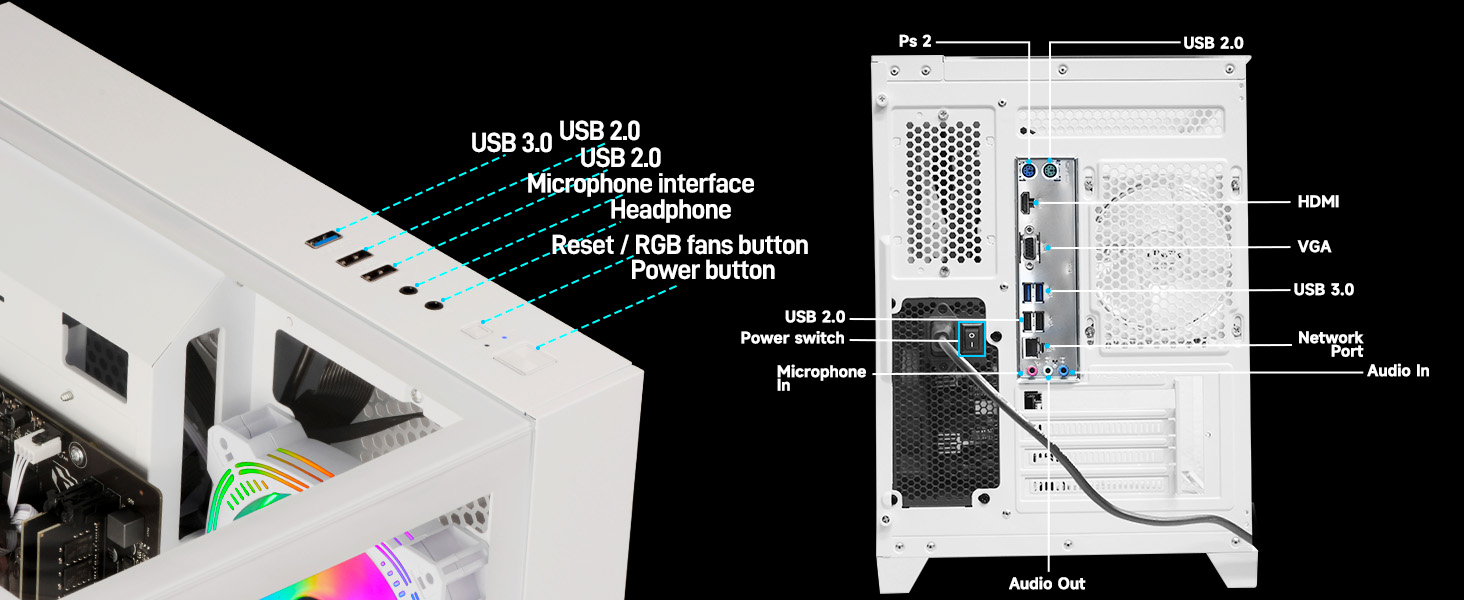
*Tip: Please ensure that both the power switch on the back of the chassis and the power button on the top are turned on before starting the computer.

Compare with LXZ Different Desktop PCs
Add to Cart
Customer Reviews
4.5 out of 5 stars 28
4.3 out of 5 stars 34
4.3 out of 5 stars 34
4.4 out of 5 stars 50
4.7 out of 5 stars 22
4.2 out of 5 stars 28
Price
—
$531.99$531.99
—
$799.99$799.99
—
—
CPU
Ryzen 5-5600GT
Ryzen 7-5700G
Ryzen 7-5700G
Corei i5-12400F
Core i5-13400F
Ryzen 7 8700F
GPU
/
/
/
GeForce RTX 3050
GeForce RTX 4060
Radeon RX 7650GRE
RAM
16G DDR4
16G DDR4
16G DDR4
32G DDR4
32G DDR4
32G DDR5
Hard Disk Size
512G
512G
1TB
1TB
1TB
1TB
WiFi
✔
✔
✔
✔
✔
✔
Graphics Card Description
Integrated
Integrated
Integrated
Dedicated
Dedicated
Dedicated
Ryzen 5 5600GT Processor: with 6 cores and 12 threads, this processor has a base frequency of 3.6GHz and supports Core technology, which is able to automatically boost the frequency when needed for heavier tasks. For multitasking and everyday office applications, it provides a smooth and unobstructed experience. The Ryzen 5 5600GT also has an integrated Radeon Vega graphics card, which means that even without an additional discrete graphics card, you can still do some graphics processing and light gaming entertainment. But if you are looking for extreme gaming effects or professional graphic design, you may need to configure an additional discrete graphics card.
16GB DDR4 RAM: 16GB of RAM is the recommended configuration for today’s mainstream gaming and efficient office work, DDR4 memory technology is not only fast, but also low-latency, which significantly improves system responsiveness and application efficiency, whether it’s working on complex documents, or running multiple programs at the same time.
Storage: 512GB NVMe SSD, Solid State Drives (SSDs) have faster read and write speeds compared to traditional mechanical hard drives (HDDs), which means your computer boots up faster, games load faster, and file transfers are faster.
Design & Extras: The PC is equipped with 5× RGB fans and lighting effects. These lights can be set according to the user’s preference, adding a splash of colour to the PC and enhancing the overall visual effect. The chassis is designed with glass panel on three sides, which allows users to visualise the internal hardware layout and lighting effects. At the same time, the glass side panels also ensure good heat dissipation performance, ensuring that the hardware remains stable under prolonged operation Applicable Scenarios
Hardware Configuration: Graphic output options include 1 x HDMI, and 1 x Display Port, Additional Ports Including USB 2.0, USB 3.0, HD Audio 3, 5x RGB fan for air flow.
8 reviews for LXZ Desktop PC Computer Ryzen 5-5600GT, 16G DDR4 RAM, 512G NVME SSD, Tower Computer with Wi-Fi & 400W Power Supply for Every Day Use, Working, Home and Office (White)
Add a review
Related Products


Original price was: $479.99.$455.99Current price is: $455.99.

Kenny Dittmer –
Great product
Fast great product
barron hilton –
DO NOT BUY. Faulty equipment.
Do not purchase! My hard drive failed and the ram failed within six months. I had to spend another $400 getting the computer repaired with new parts. I guess you get what you pay for.
Brandonwillz –
Faltó más amor
Me faltó algo donde poner mi raton
Kyle –
Solid Low End Gaming PC but Needs Upgrades For Modern AAA Titles.
I’ve had this for 3 months and it’s a solid Pre Build, although if you expect to do any higher end gaming you’re going to need to buy a better graphics card and would recommend purchasing another 16GB RAM, possibly even higher wattage PSU. With the base build it will run most modern games if graphics are set to low quality. Overall happy with my purchase just don’t expect to run any AAA 2025 game titles. It barely handled The Witcher 3 until i made upgrades for example.
King DJack –
Great
It is as advertised make sure you read it full because it tells you the graphics card it has may not work with some games you won’t be able to take out that card because the wifi is integrated into it unless your using Ethernet I got a Nivida 3050 and it works great the bad part is news is you can’t upgrade the SSD card so I’m stuck a 512gb SSD card well I got a few games that are 100gb or 200gb so I have to use my external hard drive which makes downloads and uploads slow other than that it’s a great Gaming PC.Since the review I bought a network adapter and I was able to take out the Radeon Graphics card and I was able to use a 4TB SSD Card and was able to install a 4060 GPU.
A –
Plays Fortnite Smoothly on low settings
Works very good runs Fortnite smoothly all low settings. Itâs about 100 FPS on Fortnite and 15 ping.
John J. Sanders –
I pulled the SSD on this machine
When I powered up the machine for the first time, I did not get the normal Windows introduction. It went start to Windows startup and I didn’t have to assign it to or create an account. To say the least, my eyebrow rose in suspicion. Then when it wouldn’t let me assign it to my Microsoft Account, I really became suspicious. One to two things here, either this was a used machine or it is a bootleg of sorts. Bottom line here is, I wouldn’t put anything of personal nature on such a machine if I don’t have complete Admin rights and control. So I pulled the Solid State card and put my older Windows 10 Pro SSD in it. Outside of this, I like the machine immensely, it’s fast, quiet, and it took the upgrade to 64GB RAM with ease. One of the options I could have taken, on the Windows 11 Pro would have been to do a complete Reset, and I may still do that if I reinstall the SSD card.
Nick –
Awesome
Awesome truly awesome