

Schluter Ditra-Heat-E-RS1 Smart Thermostat with Floor Sensors, Energy Tracking, GFCI Protected – Ideal for Home Floor Heating – Mirror-Finish, App Control, Voice Assistant Compatible – DHERT105/BW
Original price was: $364.88.$280.00Current price is: $280.00.

Price: $364.88 - $280.00
(as of Aug 08, 2025 10:57:09 UTC – Details)
Product Description
 Elevate Comfort with Heated Floors Thermostat
Customizable, easy-to-install floor warming accessories for any room
Schluter Smart Thermostat for the DITRA-HEAT System
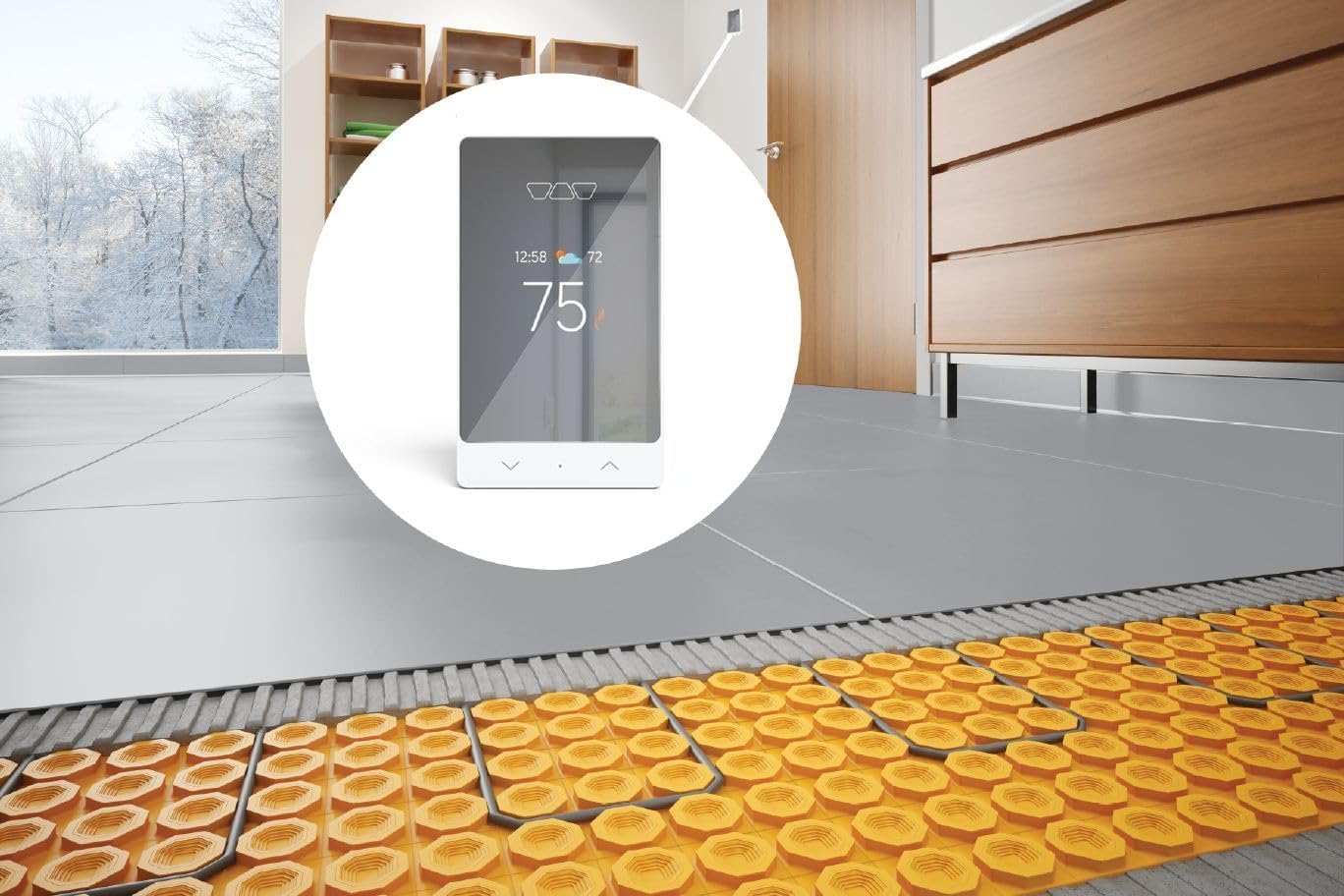
The Schluter-DITRA-HEAT-E-RS1 is a smart thermostat for the Schluter-DITRA-HEAT floor warming system. It features a sleek design with a mirror-finish and third-party integration with popular voice and home assistants to easily include floor warming into your smart home capabilities. DITRA-HEAT-E-RS1 is a smart thermostat used to control the DITRA-HEAT-E-HK heating cables (either 120 V or 240 V). The thermostat features a built-in Class A ground fault circuit interrupter (GFCI) and includes input terminals to connect a 10k floor temperature sensor. Two floor temperature sensors are provided with each DITRA-HEAT-E-HK heating cable box. The DITRA-HEAT-E-RS1 was designed to be mainly operated via the Schluter Smart Thermostat app. All features can be programmed and controlled using the app, and these features include remote access, time-temperature scheduling, maximum and minimum floor temperatures, maximum ambient temperature when in floor control mode, easy smart home integration, geofencing capabilities, etc. The basic installation setup can be programmed from the thermostat menu using the dot soft button and the arrows. Manual temperature adjustments can be made directly using the arrows. When connected to Wi-Fi, the thermostat provides convenient monitoring and adjustment of the floor warming system via our mobile app. Multiple heating cables may be connected to the thermostat up to the total heating load limit of 15 amps. The DITRA-HEAT-E-RRS power module may be used in conjunction with the thermostat when the heating load exceeds 15 amps (e.g., in large floor applications) to maintain a single point of control. This power module can only be used with the DITRA-HEAT-E-RS1 thermostat.
Note: iPhones running iOS older than version 10 and Android running versions older than 6 are not officially supported by the Schluter Smart Thermostat App.

How to Install Your Ditra Thermostat
Please refer to the Smart Thermostat Installation Manual and Schluter-DITRA-HEAT Installation Handbook for complete DITRA-HEAT system installation instructions.
1. DITRA-HEAT-E-RS1 must be installed in an electrical box. A single gang, deep electrical box or a double gang electrical box with a single gang mud ring is recommended to provide room for the wiring. The power supply must be shut off and all electrical connections must be made by a qualified person according to the electrical and building codes effective in your region.
2. Connect the heating cable ground braid to the grounding screw of the electrical junction box. Remove the faceplate from the thermostat power base by loosening the screw and tilting the thermostat upward.
3. For ease of installation, form the electrical line wires into an “M” or accordion shape. This will make it easier to fold them neatly into the electrical box. Loosen the load screws at the top of the thermostat until they stop.
4. Insert the heating cable conductors into the holes of the load terminals. Since there is no polarity, either heating cable conductor can be connected to either load terminal. Secure the conductors by tightening the screws. Insert the electrical line wires into the line terminals. Refer to the back of thermostat for proper wiring configuration.
5. Secure the wires by tightening the screws and fold the wires into the electrical box. Thread the floor temperature sensors through the slot opening at the bottom left of the thermostat power base. Tape up the secondary floor temperature sensor and secure to the power base.
6. Strip the ends of the floor temperature sensor to expose the wires for ease of installation. Insert the floor temperature sensor wires into the indicated terminals marked “Floor Sensor”. Note that the floor temperature sensor wires have no polarity and can be interchanged between the sensor terminals. Tighten the screws to secure the wires.
7. Align and secure the thermostat power base to the electrical box. The power, heating cable, and floor temperature sensor connections are now complete. Replace the thermostat faceplate and tighten the screw at the bottom of the unit.
Note: Multiple DITRA-HEAT-E-HK heating cables can be connected and controlled by a single DITRA-HEAT-E-RS1 thermostat if the total current is less than 15 amps. The heating cable leads must be wired in parallel according to applicable electrical and building codes. Multiple DITRA-HEAT-E-HK heating cables over 15 amps cannot be connected to a single DITRA-HEAT-E-RS1 thermostat. Additional DITRA-HEAT-E-RS1 thermostats must be used or the DITRA-HEAT-E-RS1 thermostat may be combined with the DITRA-HEAT-E-RRS power modules.
Comparison Chart
Smart Thermostat
Third-party integration with popular voice and home assistants
Touchscreen Thermostat
3.5” intuitive touchscreen display
Programmable Wi-Fi Thermostat
Control your floor heating system from your smartphone or online
Other Features
Multiple energy-saving functions
Other Features
Ability to track and log power consumption
Other Features
Displays local temperature and weather forecast
About Us
Always One Step Ahead of the Times!
At Schlüter-Systems, we pride ourselves on being pioneers in the tile assembly industry. Founded in 1966 by Werner Schlüter, we continue to meet the evolving demands of the industry by developing practical and effective solutions for tile installation challenges. Today, Schlüter-Systems’ has evolved from a modest idea into a company with over 40 product lines recognized and utilized in various countries around the world, maintaining our commitment to innovation, quality, and service.

Can I lock my DITRA-HEAT-E-RS1 thermostat so that no one can change the settings?
Yes, using the “Lock” function in the Schluter Smart Thermostat app menu for the particular thermostat.
How do I suspend my programmed schedule for a period of time?
Press the appropriate arrow on the thermostat to adjust the temperature, or use the Schluter Smart Thermostat app and select “Manual” to adjust it. Whenever you wish to go back to the automatic program, select “Automatic” on the app.
I have internet and cellphone issues. Can I unlock the keyboard without the Schluter Smart Thermostat app?
Yes, unplug your router and power cycle the thermostat to unlock the keyboard. This allows access to all buttons, including factory reset.
Smart Control – Easily integrates with home and voice assistants for smart home integration, enabling seamless control over your floor heating system.
Versatile – Designed for both 120V and 240V DITRA-HEAT-E-HK heating cables, with a max load of 15 amps. Additional power module available for larger systems.
Energy Tracking – Manage energy usage with a user-friendly app; ideal for keeping heating costs down during cold months.
Safety First – Features a class A Ground Fault Circuit Interrupter (GFCI) that automatically cuts power to prevent electrical shock, ensuring user safety and electrical standards compliance.
Long-Term Coverage – Backed by a 3-year limited coverage against manufacturing defects when installed per the Schluter Installation Handbook and Technical Data Sheet, following all guidelines and industry standards in effect at the time.
Customers say
Customers find the thermostat works well with heated floors and is incredibly easy to set up. They appreciate its design and wireless connectivity, with one customer noting it connects seamlessly to Wi-Fi. The thermostat functionality receives mixed reviews.
13 reviews for Schluter Ditra-Heat-E-RS1 Smart Thermostat with Floor Sensors, Energy Tracking, GFCI Protected – Ideal for Home Floor Heating – Mirror-Finish, App Control, Voice Assistant Compatible – DHERT105/BW
Add a review
Related Products


Original price was: $364.88.$280.00Current price is: $280.00.

jjwad –
Fast and Easy Setup
The Schluter Smart Floor Thermostat is an excellent choice for managing your heated floors. Itâs incredibly easy to set up, with a user-friendly interface that guides you through the installation process. The thermostat connects seamlessly to Wi-Fi, allowing you to control and schedule your heating via the mobile app or voice assistants. Its performance is flawless, setup was fast (15 min) and easy.
Sl –
easy to use and easy to install.
Clean design, easy to use, and works perfectly with our heated floors. Setup was straightforward, and it adds a nice little modern touch without being overly complicated.
Bass J. –
Great product and price
Great product and price
chiguy312 –
Does what it’s supposed to do.
This thermostat functions as expected, but the mirrored glass screen design is puzzling. It makes reading the display challenging unless the lights are turned off, which seems impractical from a usability perspective. For a better option, consider the other Wi-Fi model with a color screenâitâs more user-friendly. Additionally, the other model is similarly priced and includes a sensor that detects sudden temperature drops, such as when a door or window is opened, allowing it to conserve energy by adjusting the heat. Why wasnât that feature included in this model? Itâs a disappointing oversight. I primarily use the app to control it so 4 stars because it does what it’s supposed to do. Minus one for the stupid mirrored face.
SyfiMan –
Awesome Thermostat for Heated Floors
Installed my first heated bathroom floor with the Schluter Smart Thermostat and cabling. First of all, how wonderful it is to walk on a warm floor this past winter. What I like about this thermostat is it’s ease of use using the Schluter smart app on my phone. You have the option, of course to set a schedule but it also has a GEO location of my phone option that I like. What this means is, it automatically turns on the heated floor when you’re home and off when your not home based on where your phone is. It send me a notification when it’s in Away mode vs Home mode. This was nice at first but now, I don’t need to be notified each time I leave/return home so I’ve yet found how to turn that notification off.You set the desired temperature so once it’s reached, the heat will turn off much the same way as your home HVAC system works. In the summer, when a heated floor is not required, it simply remains off automatically so no need to adjust anything by season.It can integrate with Alexa, which I have, but I don’t use that functionality since the thermostat is pretty much set it and forget it operation.My only CON would be it’s a bit pricey in my opinion.
basescu –
Great gadget
On the expensive side but works really well – setting programming, scheduling, WiFi connectivity
Vera Stepenski –
Clicking sound when it turns on/off
Looks good, but has a few issues. I hate the clicking sound when it turns on/off, there is no wall plate included in the box, so I ended up altering some myself. Another issue is that it refuses to connect to Apple Home Kit and the customer service claims it’s Apple’s issue and not Schlutters… since this is a Schlutters product, I expected they would sort this issue with Apple and not me.
Sean Morris –
Ditra Heat Thermostat
Works Great. Easy Install. The App for Ditra Heat is poor at best. Not intuitive at all and constantly needs to be updated.
Beercules –
Bought a new property with three in floor heating systems and one thermostat had failed, perfect excuse to spend money on homekit enabled devices. While I am sure the old one was a great thermostat this new Smart Thermostat makes the old ones look like betamax, out of date technology, this thing looks absolutely gorgeous. It also extremely functional with weather and time details on the front. Its extremely responsive and works great, best of all it can be locked so its basically a display so no one can makes changes to it you don’t want too. Totally worth every cent, ill probably buy two more very shortly.
David Thomson –
I like that it keeps track of your usage.It shows charges what you are actually being charged by your local distributor, by the hour ,48 hour monthly, and year to date.
Richard Lanthier –
Configuration with the Wi-Fi was not straightfoward but once it done, it work great. I don’t get anymore GFCI error.
Antons f. –
Did not come with black wire sensor but it shows it on a last picture. Confusedâ¦
vonronge –
This is like a mirror. Smudges like crazy, can’t see the numbers on it, and looks really kitsch. I don’t know who thought this piece of trash was a good idea. Sending it back.