
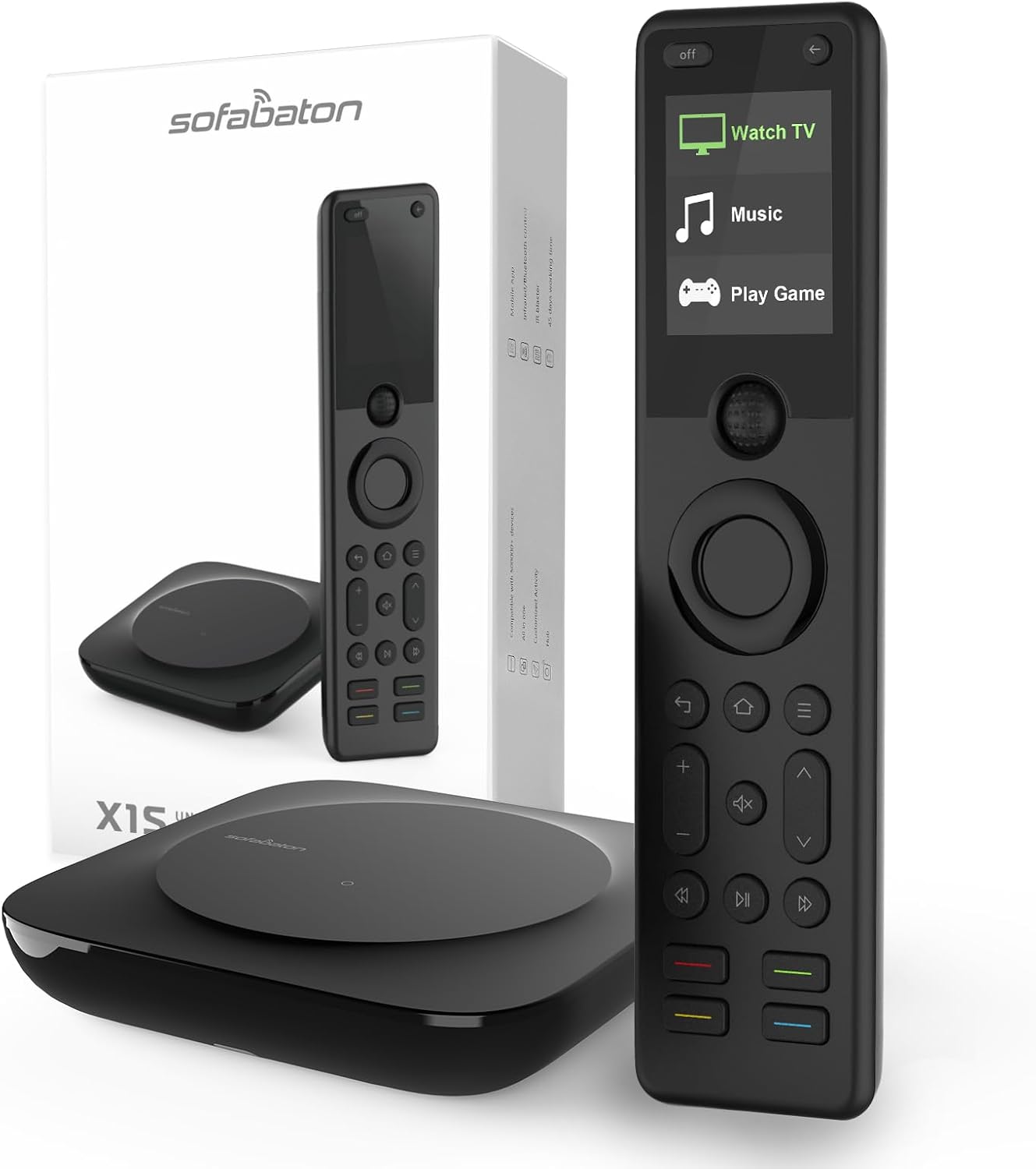
SofaBaton X1S Universal Remote Control with Hub & App, All-in-One Universal Remote for Smart TVs, DVD, Blu-Ray, STB, Projector & More, Custom Activities, Compatible with Alexa/Google Assistant
$199.99


Price: $199.99
(as of Sep 24, 2025 18:17:42 UTC – Details)
Product description

All-in-one Smart Universal Remote Control for with Hub & APP
Sofabaton X1S Universal Remote with simple setup smartphone app- control your various devices. Save yourself the trouble of finding the remote control. Just enjoy the convenience brought by SofaBaton X1S.
One Remote to Replace Them All: The X1S remote can replace up to 60 devices, including IR, Bluetooth, and Wi-Fi devices, eliminating the clutter of multiple remotes.Powerful Cloud Code Library: Equipped with a powerful cloud code library, it supports over 6,000 brands and 500,000 home entertainment devices, ensuring seamless compatibility.One-Touch Smart Control: Easily control your TV, sound system, projectors and more with the X1S, enhancing your convenience and lifestyle.User-Friendly Design: With a simple and intuitive interface, you’ll be able to get started quickly and enjoy the benefits of smart living.Automatic Updates: Supports automatic updates to ensure your remote is always compatible with the latest devices.Comfortable Grip: Made of comfortable materials, moderate size and reasonable button layout to keep you away from hand fatigue. Just one thumb can easily reach every key you want without moving your hand. Whether you are left- or right-handed, you can operate it with ease.Improved Scroll Wheel: Say goodbye to sticky scrolling! Our completely redesigned wheel features a premium high-precision encoder that eliminates the lag and unresponsiveness reported in previous models. The new mechanical structure ensures buttery-smooth navigation every time, with enhanced durability, reliable control for all your browsing and navigation needs.Perfect Gift for Everyone: Whether for birthdays, Christmas, housewarmings, or just because, this thoughtful and practical gift delights tech lovers, movie fans, and anyone who values comfort!

Create Activities In The APP To Customize Your Own Home Experiences – Enjoy a Truly Smart Life
What is Activity?
Sofabaton’s Activity feature allows you to customize the scenes you want through the APP. With just a single press of a button, you can complete all the commands and easily control your home entertainment devices.
You can create as many Activities as you’d like, combining multiple devices and triggering them all with one click.
For example, simply tap “TV Time” and the X1S Universal Remote can turn on your Sony Android TV, Philips Hue smart lights, and Sonos speaker simultaneously.
Get them to work together for a seamless, one-click experience. It’s so COOL!

Voice Control Help You Get Rid of Physically Button Pressing
Hands-free Voice Control: Works with Alexa and Google Assistant to control of your appliances. For example, if you say, “Alexa, watch a movie,” Alexa will automatically start the projector, speakers, and media players to enter movie mode quickly.

Backlit Buttons For Easy Navigation In The Dark
Our X1S remote control features an intelligent backlit button design, allowing you to easily find the needed keys whether it’s nighttime or in a dim environment, reducing the risk of misoperation and enhancing the user experience. The backlit buttons not only add a touch of technological sophistication and modernity but also use low-power technology to ensure energy efficiency. Whether in a home theater or a bedroom, backlit buttons provide convenient and safe operation under any lighting conditions.

Control Without Pointing or Aiming
X1S Hub offers 360-degree control and a solid, reliable signal with an infrared transmission range of up to 40 feet. You can easily control your device from your couch or anywhere in the room without aiming your remote at the devices.
It comes with 2 IR blasters, which solves the problem of signal blind spots and prevents the signal from being blocked. The cool thing is that you can hide the Hub in the cabinet to create a neat entertainment area.
Here are some tips for positioning the X1-Hub and using IR signals with your devices:
– If your cabinet is open, place the X1-Hub on top of it or on a large, unobstructed shelf.
– IR signals from the hub will reflect off walls and other surfaces before reaching your devices, so a direct line of sight is generally unnecessary.
– However, do not place the hub directly behind or above your devices.
– If your device is in an inaccessible corner or cabinet, use an IR blaster with the transmitter pointed at the device.

Say Goodbye to Multiple Remotes – Control Everything with the Sofabaton X1S
The design of the X1S remote control without numeric buttons makes the device more sleek and aesthetically pleasing, enhancing the overall visual experience.
Although our X1S universal remote control does not have numeric buttons, you can achieve this functionality by saving your favorite channels and creating Macros.
Here are the steps to create a Macro:
1. Select the activity–edit–Assign commands for remote keys–select any unassigned keys–Short or Long press–Macro keys;
2. For example, if you want to set Channel 1542, you can create a Macro named 1542, including four separate commands: 1,5,4,2; This Macro will be functioning on the assigned physical button of our remote;
3. In this way, you can quickly access this channel by pressing this physical button.

Beep Tracker Remote Function:
Quickly and efficiently find remote with the beep tracker function, you’ll never have to worry about losing your remote again.
Easily locate your misplaced remote with a simple tap on the “Find My Remote” button in the app. The remote will emit a beep or sound, guiding you to its exact location. No more wasting time searching for your remote.
Raise to Wake:
The “Raise to Wake” feature automatically lights up the display when you lift the remote, saving both time and energy.
Powerful Real-Time Updating Code Library:The SofaBaton X1S universal remote control supports over 500,000 devices across 6,000 brands, including IR, Bluetooth, and WiFi devices. With a continuously updated database, it ensures seamless control over multiple remotes for an effortless experience.
One-Click Activity: SofaBaton X1S Universal Remote enables one-click Activity based control of your home entertainment system. Tap an activity like “Watch Movie” to automatically power on and switch devices like your TV, AV receiver, and Blu-ray player to the right settings.
Ultimate Control Anywhere in the Room:The X1S Hub delivers powerful 360-degree infrared signaling with a robust range of up to 40 feet, allowing effortless control of your devices from anywhere in the room without needing to aim your remote at the devices. Equipped with 2 IR blasters, it eliminates signal blind spots and ensures uninterrupted connectivity. You can even hide the Hub in a cabinet for a clutter-free entertainment area.
Compatible with Alexa and Google Assistant: Our X1S universal tv remote allows you to control various devices with voice commands effortlessly.Whether it’s turning devices on or off, or switching between different activity scenes, everything can be easily achieved.
Customize Buttons & Macro Function:Sleek and simple design reduces button clutter, making operation more intuitive and efficient. Easily set up favorite channels and customize buttons via the app for quick, one-touch access. Utilize macro functions to simplify your workflow, allowing multiple actions with a single press.
Motion-Activated Backlit Buttons & LCD Screen: Easily find the right button even in the dark with motion-activated backlighting, providing excellent visibility and convenience in low-light environments. With the improved scroll wheel ensures smoother navigation and enhanced durability.
Convenient API Integration:Seamlessly integrate with popular platforms like IFTTT or iOS Shortcut by simply copying and pasting URLs for each activity. This easy setup empowers you to bring your intelligent ideas to life, offering a variety of creative solutions and enhancing your smart home experience.
Lift-to-Wake Feature:Simply lift the universal remote control to instantly light up the screen, providing immediate control without pressing any buttons. The energy-efficient design ensures the screen turns off when not in use, conserving battery life.
Never Lose Your Remote Again: Say goodbye to the frustration of lost remotes with our Universal Remote’s innovative ‘Find My Remote’ feature. Simply use our Sofabaton app to instantly and effortlessly locate your remote, which will emit a sound to ensure you always stay in control.
Ergonomic Comfort & Perfect Gift: Made of comfortable materials, moderate size and reasonable button layout to keep you away from hand fatigue. Just one thumb can easily reach every key you want without moving your hand. Ideal for both left- and right-handed users, it’s the perfect practical gift that delights tech lovers and movie fans alike, making birthdays, Christmas, housewarmings, and special occasions even more memorable.
Customers say
Customers find the universal remote control works well with various devices and appreciate its programming capabilities, with one customer noting it has a fairly robust set of built-in codes. The setup process receives mixed feedback from customers.
8 reviews for SofaBaton X1S Universal Remote Control with Hub & App, All-in-One Universal Remote for Smart TVs, DVD, Blu-Ray, STB, Projector & More, Custom Activities, Compatible with Alexa/Google Assistant
Add a review
Related Products


$199.99

Working Hard –
Excellent remote but requires a little research to set up
I finally found a good Harmony replacement. I have a relatively simple set up with a TV, cable box, Apple TV, DVD player and sound bar. The X1S works well with all of these and was smart enough to automatically suggest various activities that group the right devices together. The one watch out is that setting up the remote isn’t intuitive or easy. I tried it on my own and failed. It was frustrating. But watching videos on YouTube helped me figure out how to make it work. And I now love it.
J. Papadopoulos –
The Harmony Replacement You’re Looking For
After using it for a month, I can say this is a great remote for anyone looking for something to replace a bunch of remotes – it has bluetooth (AppleTV) and IR capability and a fairly robust set of built in codes (with the ability to EASILY learn new ones… takes just a moment).You’ll need a smartphone to set it up properly – and the app works really well, but there is a lot of small text and some minor translation/ grammar errors that make it feel a little budget. It also means that if you’re not tech savvy and want to learn how to adjust commands or set up macros, this remote is NOT for you.If you’re comfortable with setting things up and fixing commands to make things work perfectly, this is great for you. Don’t wait. Just buy it – you’ll be happy. It has a number of IR blasters and the screen is great.That’s all the good – now the bad:-No number pad. I don’t understand by, but that’s their choice. I guess they assume most people don’t use cable boxes, but if you have one, there’s no numbers.-You can access ANY button from your original remote, but you have to dig through a menu in the screen to do it. Takes a while.-The screen itself is nice, but there’s no way to customize sizes of fonts/ brightness. This is annoying because there’s room for exactly three “activities” on the screen, with no indication that there’s more to scroll down to.-Repeats and such for fast volume controls are a little fickle. Not horrible but just not at all like the original remote my Denon receiver came with, for instance.-AppleTV recognizes it as a keyboard – that’s fine, but it also means that when you switch to the activity with it, I typically have to press “home” again for the remote to connect – it’s not always connected like the Apple Remote is.-Too many hoops/ clicks to do what would normally be a physical button on the original remote – you’re giving up a lot of convenience for a simple remote interface.None of those are deal breakers, but it would be good to know if any of them annoy you so you don’t end up replacing it. All of those are things I didn’t’ like but I still prefer this to the stack of 8 remotes I used to have littering my space. And as a former Harmony user, this is the heir apparent. 🙂
Amazon Customer –
Successfully replaced the Harmony Elite
Totally replace my Logitech Harmony Elite. Previous I need an IR blaster in my harmony setup for one device. The new sofabaton setup do not required the blaster to make that device work.
andrew –
great remote and hands free
I love this remote. the fact that I can control multiple devices at once is so easy and no more of a need to use multiple remotes. the best thing though, I can use my voice assistant to turn things on all at once when I enter the room, so as I’m getting comfortable on the couch, everything is loading up even before I touch the remote. I even have an activity that will navigate through my portable hard drive that is plugged into my tv to any shows that I might have on there, all hands free. I will say that it is a little fiddley on the voice assistant app to get it to work every time, but that isn’t a remote issue. in all this remote is a game changer
startagl –
Doesn’t have an IR emitter.
There is technically nothing wrong with this remote. But yes there is…a major thing that I’ve not seen a single review talk about… IT DOESN’T HAVE AN IR EMITTER “.So you can’t hide the hub in your equipment rack and control your TV and equipment. Because the remote doesn’t have an IR emitter. All the commands are sent from the hub. If your equipment is not in the same room as your sofabaton hub you can not control your TV. Close to useless.This is being promoted as a replacement for the Logitech Harmony remotes. It is not. The Harmony remote hub had an IR emitter.sofabaton what did you do? Save 3 cents by not putting in an emitter? What a waste.
Chris Adams –
Overall it gets the job done and I would recommend
The setup process for the X1S Sofabaton universal remote wasn’t very easy, and I encountered some difficulty programming specific buttons. The device is also quite susceptible to interference; the hub and remote struggle to sync if other IR remotes are active nearby.Despite these issues, the remote performs about 99% of the functions I need, and in my opinion, there isn’t a better alternative currently on the market. The customer service has also been excellent.Overall, the remote gets the job done and I would recommend it.
George N. Sapio –
Great replacement for discontinued Logitech Hub
This is the only option if your previous Logitech hub stopped working because they no longer support that product. I switched in this hub and I was back up and running
Springspeed –
Programmable universal remote
This is not a Harmony but you can’t buy them. i miss the software that let you run audio thru it’s own HDMI and video out another……not infinite in/outputs. I don’t like high end audio going thru the same cable as video. I can’t get this to control my Xfinity box XG1v4-A, checked lots of places on the net…..samething. It’s does run my receiver, my 4k player, my computer. I haven’t figured out how to turn off devices when i go to another device. Sofa Baton needs to look at the software Harmony had. Curious how Alexa would interface with this. Not perfect but as good as you can get currently.