

TP-Link WiFi Extender with Ethernet Port, Dual Band 5GHz/2.4GHz, Up to 44% More Bandwidth Than Single Band, Covers Up to 1200 Sq.ft and 30 Devices, Signal Booster Amplifier Supports OneMesh(RE220)
Original price was: $14.99.$12.17Current price is: $12.17.


Price: $14.99 - $12.17
(as of Aug 08, 2025 04:50:32 UTC – Details)
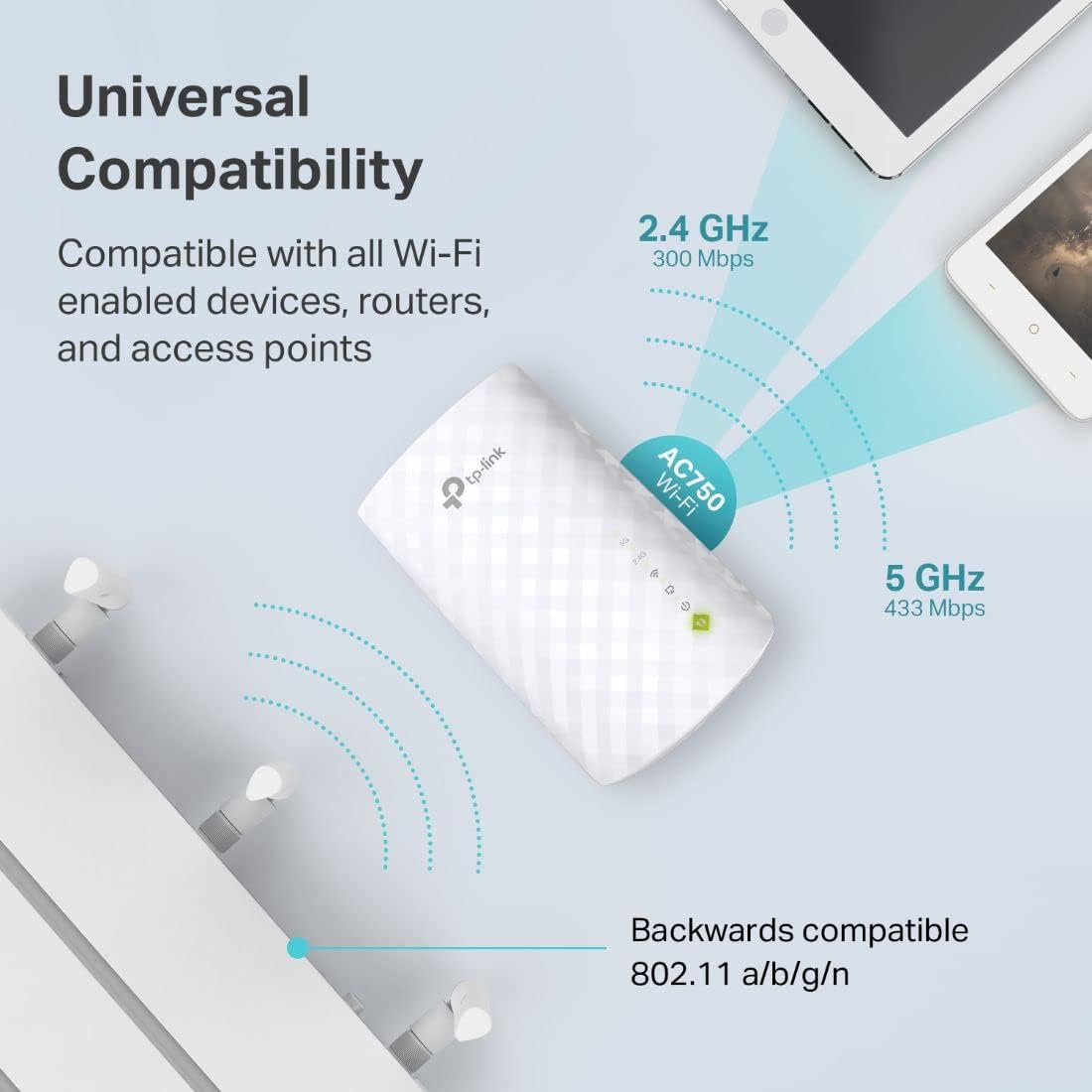
RE220 expands your existing Wi-Fi coverage with next generation 11AC Wi-Fi technology. It works with any standard Wi-Fi router and creates stronger dual band connections in hard-to-reach areas, allowing you to enjoy seamless wireless coverage throughout your home or office. RE220 provides APS (Adaptive Path Selection), with APS, Dual band or tri-band range extender can dynamically select the best backhaul connection between 2. 4/5G/5G2 to ensure RE to router have the best connection, and in such way maintain a better overall Wi-Fi performance. Comparable to NETGEAR AC750 Wi-Fi Range Extender (EX3700-100NAS) Maximum wireless transmission rates are the physical rates derived from IEEE Standard 802. 11 specifications. Range and coverage specifications along with the number of connected devices were defined according to test results under normal usage conditions. Actual wireless transmission rate, wireless coverage, and number of connected devices are not d, and will vary as a result of 1) al factors, including building materials, physical objects and obstacles, 2) network conditions, including local interference, volume and density of traffic, product location, network complexity, and network overhead and 3) client limitations, including rated performance, location, connection quality, and client condition. Operating Temperature: 0°C to 40°C (32°F to 104°F).
Dual Band WiFi Extender: Up to 44% more bandwidth than single band N300 WiFi extenders. Boost Internet WiFi coverage up to 1200 square feet and connects up to 30 devices(2.4GHz: 300Mbps; 5GHz: 433Mbps).Transmit Power – FCC: < 30dBm..Operating Temperature : 0°C ~ +40°C
No More Dead Zones: Eliminate WiFi dead spots and enjoy lag-free connections on any device, including wired devices via the Fast Ethernet port, perfect for security cameras(indoors and outside), smart phones, smart TVs, Fire Sticks, Alexa Echo and more
Effortless Setup: With just 2 taps, you can easily connect to your Wi-Fi network, while the smart indicator light ensures optimal installation location for the best performance
Multi-Mode Flexibility: Transform your wired internet connection into a wireless access point using the RE220’s Ethernet port, or use it as a wireless adapter to connect wired devices like gaming consoles or smart TVs. It’s more than a WiFi Extender
OneMesh Technology: Pair this range extender with TP-Link OneMesh routers like Archer AX21 or Archer A7 to create a seamless OneMesh network for smooth roaming across your entire home
The Ethernet port of RE220 can easily turn your wired Internet connection into a wireless access point. It can also function as a wireless adapter to connect wired devices, like Blu-ray player, game console or smart TV
All Wi-Fi extenders are designed to increase or improve Wi-Fi coverage, not to directly increase speed. In some cases improving signal reliability can affect overall throughput
Customers say
Customers find the WiFi extender works well, is easy to set up, and delivers good speed with download rates exceeding 50 Mbps. They appreciate its range extension capabilities, with one customer noting it helps with streaming. The signal strength and value for money receive mixed feedback – while some report good signal and consider it a great value, others experience low signal and consider it a waste of money. The connection quality also gets mixed reviews, with several customers reporting disconnection issues.
9 reviews for TP-Link WiFi Extender with Ethernet Port, Dual Band 5GHz/2.4GHz, Up to 44% More Bandwidth Than Single Band, Covers Up to 1200 Sq.ft and 30 Devices, Signal Booster Amplifier Supports OneMesh(RE220)
Add a review
Related Products



Original price was: $14.99.$12.17Current price is: $12.17.

MojaveDan –
Fast setup, solid performance â great value despite the reputation
I purchased two of these TP-Link WiFi Extenders to upgrade the home network at my property in Vietnam, where Iâll be staying for a few weeks. Yes, Iâm aware TP-Link has caught some heat lately for alleged backdoor concerns â but setting that aside, I have to admit: these things are incredibly easy to install and use.Setup took less than 5 minutes per unit. Just plug it into a wall socket (they work fine with 220V AC, no adapters needed), press the WPS button, and you’re done. No headaches, no complicated apps or settings.The range isnât amazing, but thatâs not really what I needed. I just wanted to fill in a few WiFi dead zones around the property, and these extenders did the job just fine. I also appreciate the built-in Ethernet port, which adds flexibility for wired connections if needed.Considering the price is significantly lower than other brands, this was a great value purchase for my needs. Not the most powerful extender out there, but it gets the job done quickly and cheaply.
Joe Tairei –
Affordable, easy to set up, works well
I bought this TP-Link WiFi extender over a year ago, to provide a strong signal for devices in my home office as well as some outdoor wifi cameras that were having trouble locking onto the main router’s wifi signal.Thus far, it has worked reliably; it is a set-it-and-forget-it type of device that, once you have configured it, just works, 24×7. For the price, it’s very good and seems to extend quite far into the yard even through a wall (30-40 feet).You have to name the extender something different from your primary wifi network. For example, if your network is named “living-room”, you would name the extender network something different such as “bedroom”. Since it provides both 2.4 Gh and 5 Gh bands, you typically will have “bedroom” and “bedroom-5g”.Once it is set up, the extender connects to “living-room” (to use the above example) and amplifies the signal locally. Thus, while you are in the bedroom, you should enjoy a good strong wifi signal. If you happen to turn off the living room router, of course, you will also lose the bedroom signal.For the price, this extender is a no-brainer. The next step up would be a mesh system, which is much more expensive but provides you with an even better approach which is the same name all through the building. Instead of having to log into several wifi networks on all your devices, now you would just have one (e.g., “livingroom”) and it automatically handles the extender feature without forcing you to go through all this extra name rigamarole. Meshes are definitely next level.But for the tiny cost of the basic TP-Link extender, which honestly is cheaper these days than a large 3-topping pizza, you can get by very well. After over a year, my extender is still going strong, as are the two other TP-Links I have around the house.The only issue I’ve had is that once in a while, typically after a power outage, the extender may require a reboot, for some reason. Inside is a tiny computer (probably) running some flavor of Linux and in the event of a glitch, sometimes it does not properly shut down and thus needs to cleanly recycle. Unplug it, wait 30 seconds, then plug back in, the LED indicator lights will gradually turn back on, and it should be up and running again. You have to make sure your wifi router is already up and running, of course, or it won’t have anything to connect to. If this doesn’t work, press the reset button for 20 seconds, connect a phone or tablet to the TP-Link hotspot and go through the setup process. I have had to do this once or twice and everything worked perfectly once complete.All in all, it is a highly recommended device that will make it easier to browse the web in anything larger than a one room apartment.
clutchman27 –
Extend wifi connection
We recently faced a frustrating issue with our TV, where the Wi-Fi connection started to drop intermittently. It turns out the TV had known issues with its internal Wi-Fi adapter, leading to poor performance. Since the TV didnât have a reliable Wi-Fi connection, we explored alternatives and decided to use the Ethernet port on the TV as a solution, without the hassle of running long cables through the house.After some research, we found this Wi-Fi extender. It promised to be a quick and easy way to extend our existing Wi-Fi connection and provide a wired connection to our TV through its Ethernet port. This seemed like a perfect solution to avoid having cables strewn around the house while still maintaining a stable connection.Setup Process: Setting up the extender was incredibly straightforward. We followed the simple instructions, and within less than 20 minutes, we were able to get everything up and running. The device itself was easy to pair with our existing Wi-Fi network, and we didnât experience any connectivity issues during the setup. The process was far simpler than I expected, which was a huge relief, considering my limited technical expertise.Performance: Once the setup was complete, we connected the extender to the TVâs Ethernet port, and the TV immediately began working properly again. The Wi-Fi signal was strong and stable, and there was a noticeable improvement in streaming quality. Our TV was back to normal, and we didnât experience any further issues with lag or buffering.Wi-Fi Extender Features: One thing to note is that the extender creates two new Wi-Fi networks (SSIDs) once it extends your connection â one for the 5GHz band and another for the 2.4GHz band. This is helpful because it allows for more flexibility depending on your deviceâs requirements. Some devices might perform better with the faster 5GHz band, while others might connect more reliably to the 2.4GHz band over a longer distance.While itâs a useful feature, itâs worth mentioning that this might create some additional network management on your end, especially if youâre accustomed to using a single network name for everything. However, it wasnât a dealbreaker for us, as the extender provided the desired functionality without much hassle.Final Thoughts: In conclusion, this Wi-Fi extender provided an excellent, hassle-free solution to our TVâs connectivity issues. The quick setup, combined with the reliable performance, allowed us to avoid running messy cables through the house while still using the Ethernet port for a stable connection. The ability to extend both 5GHz and 2.4GHz networks further improves versatility and ensures good performance for different types of devices.If you’re in a similar situation with a TV that has Wi-Fi connectivity issues and want a simple way to use the Ethernet port without cluttering your home with cables, this extender is a great option. It was easy to set up, and it solved our TV’s connectivity problem in under 20 minutes. Highly recommended for anyone looking to improve their Wi-Fi experience without too much hassle.
Amazon Customer –
works well for the (excellent)price just dont connect too many devices to it
a little slow but works well for its price, and does the job of extending the wifi to a dead zone. i only needed to have a wifi camera, and a wifi garage door opener connect to it so it’s fast enough for that, but i def wouldnt recommend having many devices connected to it, especially if they need a lot of bandwidth. Its very reliable though, stays connected, and app is easy to use and setup.i like tp-link products, and would def recommend this if you need a wifi extender to connect a few devices your router cant reach. If your worried it might be too slow, or it cant handle the amount of devices you need it to connect to, just spend a little extra and get the faster version to eliminate any possible lagging issues.
Cynthia –
Me funciona perfecto,alcanza muy bien la señal y es fácil de instalar. Recomiendo esta compra.
Omar –
High Efficiency in low price and long range signal.
Antonela –
At the beginning I was not able to connect following the instructions so I tried the second option and it worked. Much easier btw
Francisco Aguilera –
Buena calidad, fácil de usar
Abdul K. –
I picked up the TP-Link AC1200 WiFi Extender (RE315) to eliminate dead zones in my home, especially for my office and living room. After some testing, hereâs what I think about it:ProsSeamless connection: Works great with TP-Linkâs OneMesh system. My devices now switch between the – router and extender seamlessly without dropping the connection.- Improved coverage: Eliminated dead spots, and Iâm now getting full-strength WiFi in areas thatpreviously had weak signals.- Easy setup with WPS: Plug it in, press WPS, and it pairs with the router in minutes.- Affordable: Itâs budget-friendly compared to other extenders on the market.Cons- Slower speeds on extender: While the main router hits 600 Mbps, the extender maxed out at around 90 Mbps down, which is expected for a WiFi 5 device.- Not ideal for non-TP-Link routers: Performance and compatibility issues may arise with other brands like Bell or Rogers.- Setup struggles: The manual isnât clear, and I had to rely on tech support for help during the initial setup.- Limited speed improvement: If youâre expecting speeds close to your routerâs performance, this extender may fall short.The RE315 isnât perfect, but itâs a reliable solution for fixing weak WiFi spots. Itâs a great option if youâre using a TP-Link router with EasyMesh and value budget-friendly gear. Just donât expect blazing speeds or flawless performance with non-TP-Link setups.