

VPFET HDMI Audio Extractor 4K HDMI to Optical 3.5mm AUX Audio Adapter Splitter Converter Support HDCP Digital DTS 5.1 PCM
Original price was: $19.99.$18.99Current price is: $18.99.



Price: $19.99 - $18.99
(as of Oct 31, 2025 15:36:37 UTC – Details)
From the brand


VPFET is a one-stop high-tech company integrating innovation, R&D and manufacturing. Our main products include USB/HDMI switches and various video/audio transmission devices. With an experienced and senior team, the company has been dedicated to providing customers with excellent products and quality service since its inception by virtue of its highly qualified personnel and considerate service.
HDMI Ethernet Extender
Audio Splitter/Converter
What makes our products unique?
We have a dedicated product development team and are committed to giving our customers a unique experience by providing the best products.
What problem are we solving?
Whether you need an audio extractor, internet converter, extender, gaming, or projector splitter, we can provide you with a simple and efficient solution.
Is the quality of our product superior?
Our company has its own independent factory and strictly enforces quality control for our products.
Product Dimensions : 2.28 x 2.05 x 0.87 inches; 5.82 ounces
Item model number : EDUPUP
Date First Available : February 16, 2020
Manufacturer : VPFET
ASIN : B084T4QDFP
Best Sellers Rank: #1,373 in Electronics (See Top 100 in Electronics) #1 in Digital-Analog Converters
Customer Reviews: 4.1 4.1 out of 5 stars 2,157 ratings var dpAcrHasRegisteredArcLinkClickAction; P.when(‘A’, ‘ready’).execute(function(A) { if (dpAcrHasRegisteredArcLinkClickAction !== true) { dpAcrHasRegisteredArcLinkClickAction = true; A.declarative( ‘acrLink-click-metrics’, ‘click’, { “allowLinkDefault”: true }, function (event) { if (window.ue) { ue.count(“acrLinkClickCount”, (ue.count(“acrLinkClickCount”) || 0) + 1); } } ); } }); P.when(‘A’, ‘cf’).execute(function(A) { A.declarative(‘acrStarsLink-click-metrics’, ‘click’, { “allowLinkDefault” : true }, function(event){ if(window.ue) { ue.count(“acrStarsLinkWithPopoverClickCount”, (ue.count(“acrStarsLinkWithPopoverClickCount”) || 0) + 1); } }); });
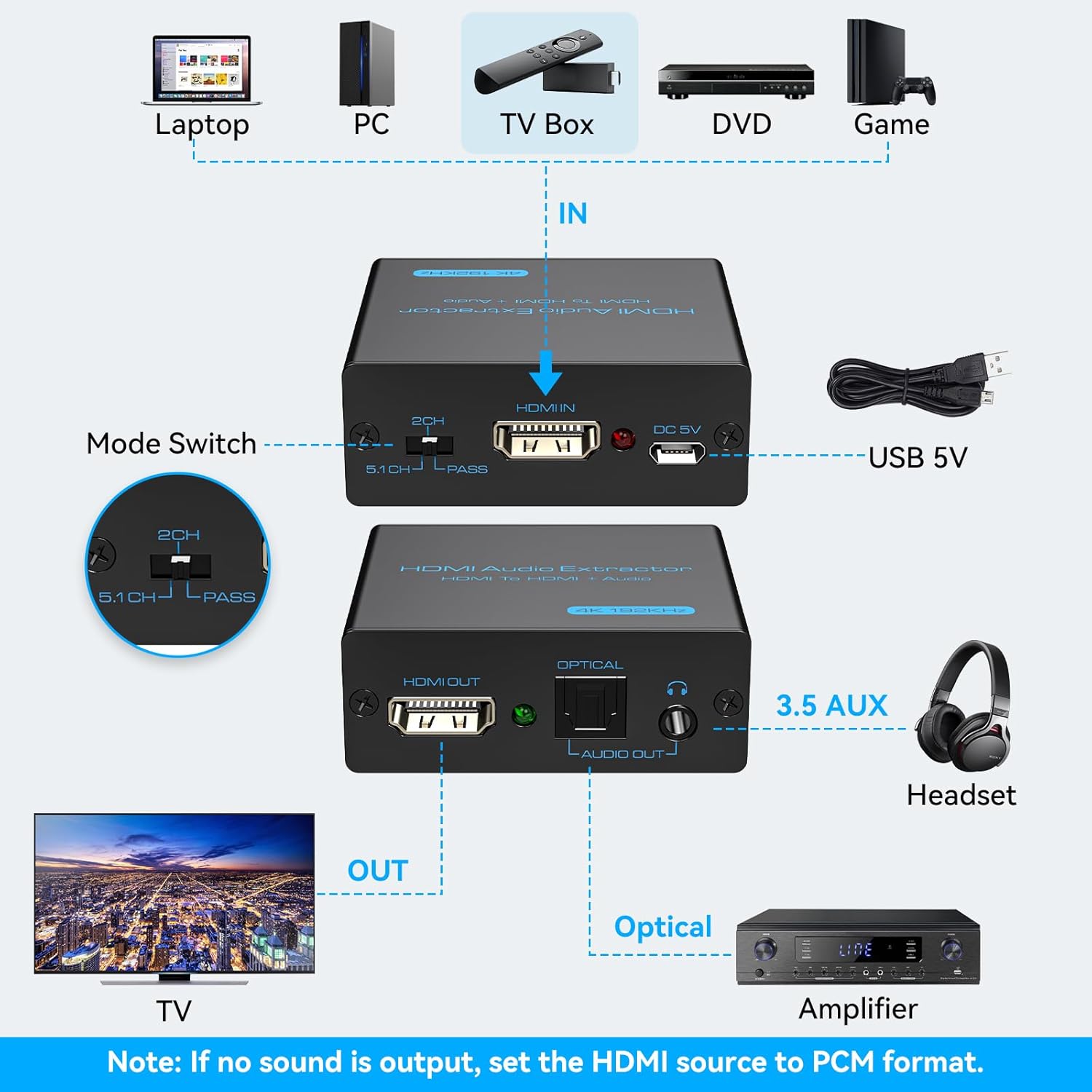
【HDMI Audio Extractor】The HDMI audio extractor can extract audio from HDMI signal and transmit it to AV receiver through optical or 3.5mm Cable.(Note: Devices do not support ARC and eARC.TV is not supported as the input source,otherwise product doesn’t p video.)
【3 modes】2.0CH, 5.1CH and PASS mode. Select 3.5mm stereo output, please use 2.0CH mode. Select optical output, please use 5.1CH mode. When you use the first and two modes and find that no audio and video signal is output, use the pass mode.
【4K Ultra-HD with HDMI 1.4V】HDMI audio converter up to 10.2G bandwidth, support HDCP1.4,4K@30Hz RGB / YUV4:4:4 Ultra high definition image quality. The optical output supports DTS 5.1. The 3.5mm output supports PCM2.0. The audio splitter does not support 7.1 channels.Note: Fire TV, Apple TV, PS4/5 etc. only support 1080p format signals and do not support 4K
【Low energy consumption】HDMI audio splitter has a low energy consumption,only requires the USB port to be connected to the 5V-USB port of another device to work. Or use your other 5V-USB power adapter
【Wide Compatibility & Plug and Play】Suitable for various HDMI source devices without dedicated audio output as well as Blu-ray/ DVD/ HD player, cable/satellite box, Amazon Fire TV, PS4,PS5, Xbox, PC/laptop etc
【Belongs to your Guarantee】If you encounter any problems in the process of use, please contact us, we will assist you until the problem is solved, within one year, if the product is damaged defects and other problems, we will provide replacement products service
Customers say
Customers find the HDMI audio extractor works well, is easy to set up, and consider it good value for money. The sound quality and video resolution receive mixed feedback – while some report good sound and picture quality, others mention issues with sound disappearing and only 1080p resolution. Compatibility is also mixed, with it working well with Roku Express but not with Apple TV. The audio functionality receives mixed reviews, with some customers successfully extracting digital audio while others report the device no longer extracts audio.
5 reviews for VPFET HDMI Audio Extractor 4K HDMI to Optical 3.5mm AUX Audio Adapter Splitter Converter Support HDCP Digital DTS 5.1 PCM
Add a review
Related Products




Original price was: $19.99.$18.99Current price is: $18.99.

Dan C –
Works for getting digital audio for a projector setup
I run a decent, budget projector in a spare room and wanted to upgrade the audio. Projector has no digital audio out to run to my sound bar, this allowed me to run a toslink cable and push dolby digital surround to my sound system. Nice little bonus is it received power from the Firestick so I didn’t need to run the extra usb power cord. This is able to push a signal through a 25ft toslink cable. No impact on video quality, sound quality is great. Awesome little gadget!
Tim Brown –
Great for Unlocking Digital Audio from HDMI-Only DevicesâWorks Perfectly on Old Blu-Ray & Linux!
This little gadget impressed me in two different scenarios, giving me digital (optical) audio out both times.First, a quick backstory: My trusty 20-year-old CD playerâs display finally gave out. Rather than buy a new player, I grabbed a spare Philips Blu-ray player I had lying aroundâbut it only had HDMI out, no digital audio output. The HDMI audio extractor solved the problem: it redirected the digital audio signal from the HDMI output to optical (TOSLINK) for my DAC. Worked flawlessly! (Side note: I later bought a remote for my old Sony Blu-ray, which has digital audio out built in, but the extractor saved me for a while.)Second (and more unique) use: I have a Linux computer that stores my music and also use it for work investigationsâI donât want to risk messing up my work or personal machines. Audio on Linux can be hit-or-miss, and with both Dell laptops and an older Ryzen desktop, I always get interference through the 3.5mm jack. However, this desktop has an old Nvidia 710 card with HDMI out. According to the specs, it should pass digital audio over HDMIâso I tried the extractor here too. After making sure the right audio drivers were installed and giving the machine a final reboot, the extractor showed up as an audio device and I could select it as the default sound output. I sent the optical signal to my Klipsch Fives speakers, and for once I got the best sound Iâve ever heard from a Linux system in over 20 years.Sound Quality:When it comes to digital, people sometimes debate if different devices âsoundâ different, but in my experience, if the device reliably reads and passes along the source bits, the real âsoundâ comes from your DAC and speakers or headphonesânot the extractor itself. For me, the digital audio from this extractor is perfectly fine. I canât comment on 5.1 channel support since I only used 2-channel digital output, but for stereo listening, itâs rock solid.Bottom Line:If you need to get digital audio from a device that only has HDMI outâwhether youâre using Windows, Linux, or even an old Blu-ray playerâthis extractor does the job. Highly recommended, especially if youâre trying to squeeze more life out of older hardware.
Gabrielle Robison –
Price was great and it works
Small, easy to install and it works! I can finally listen to my tv through my JVC system!
a2020 –
Some XBox Series S/X compatibility issues
I bought this since the XBox Series X doesn’t have a built-in TOSLINK port (thanks, Phil). Unfortunately, while the device clearly physically supports 4k and DTS Digital, with the XBox I have to choose one or the other. With the audio selector switch in “Pass” and an optical cable connected to my Denon receiver, the XBox detects (incorrectly) that only stereo out is supported (no surround sound), but it will output a 4k signal to my projector. When I shift the selector switch to the manual 5.1 position, the XBox now offers Dolby and DTS Digital Surround options, both of which work with my receiver and sound amazing, but the video resolution drops to 1080p. There’s still an option to switch to 4k, and it works (projector detects and displays a 4k input signal), but when I click the “Keep” button to maintain that resolution everything shifts back to 1080p, and the XBox “Video Info” dialog incorrectly reports that my display doesn’t support 4k at either 60 or 120 Hz.To be fair, the root causes here are typical Microsoft arrogance: saving maybe a buck per console by dropping a port that most customers never use (but that they supported on the 360 and XBox One, and for which a lot of gaming-specific accessories (headphones) exist), and then failing to provide a manual “Trust me, I want DTS output” option when their auto-detection fails. And I can’t think it’s anything but a bug that the Series X will let me select, and correctly display, a 4k resolution, but then insist that it’s unsupported and auto-shift back. However, I think there’s also a flaw in the way VPFET implements the audio EDIDs; when the selector switch is in PASS the extractor doesn’t correctly report capabilities of the downstream optical device, while when it’s in 5.1″ option it doesn’t correctly report capabilities of the downstream video device. There may well be a technical reason for the former (I’m not an S/PDIF expert), but the latter is surely avoidable: either overwrite just the audio portion of the EDID coming from the downstream display (leaving the supported resolutions intact), or simulate some maximally-capable UHD device. Whatever they are reporting when the switch is in 5.1 clearly isn’t satisfactory for some game consoles.Anyway, aside from this the device works great, even with other 4k sources, but I wanted to put a warning out there for anyone thinking of connecting it to an XBox that you may want to go with one of the more expensive name brands with verified support.
T. A. –
Works as intended.
I got this to combine a used LG soundbar with a used iLive subwoofer that I got from Goodwill, with my laptop and projector. I kept reading it’s not possible to use soundbars and subwoofers from different brands. Even if they’re from the same brand, they have to be part of the same model because they’re configured to work only with specific hardware. This VPFET HDMI Audio Extractor bypasses all that. I connected the HDMI from my laptop to the HDMI Input on the extractor. Then, the optical output from the extractor to the optical input on the soundbar, the 3.5 headphone output from the extractor to the subwoofer via a 3.5 to RCA Y adapter cable, and finally the HDMI output from the extractor to the HDMI input of the projector. It works flawlessly. Very happy with the device, highly recommend it if you’re looking for a similar setup with used soundbar/subwoofer of different brands.